

Paper Menu >>
Journal Menu >>
 J. Biomedical Science and Engineering, 2011, 4, 90-93 JBiSE doi:0.4236/jbise.2011.42012 Published Online February 2011 (http://www.SciRP.org/journal/jbise/). Published Online February 2011 in SciRes. http://www.scirp.org/journal/JBiSE PHYLIP-GUI-Tool (PHYGUI): adapting the functions of the graphical user interface for the PHYLIP package Yukinori Eguchi Research Laboratory Center, F aculty of Medicine, University of the Ryukyus, Okinawa, Japan. Email: [email protected] Received 3 December 2010; revised 27 December 2010; accepted 4 January 2011. ABSTRACT The PHYGUI for the PHYLIP package is a simple and user-friendly piece of software that acts such as a Windows based graphical-user-interface for the PHY- LIP phylogenetic data analysis package. PHYLIP is a useful and powerful tool for phylogenetic research that is regretfully operated using a character-user- interface. Therefore, PHYLIP is difficult for beginner level users. The PHYGUI for PHYLIP adds a GUI function, which makes it a more user-friendly and powerful tool. PHYGUI runs on multiple platforms such as MS-Windows and X windows on Mac OS-X and Linux systems and is mainly operated using a mouse. The input data file and the output result data files can be viewed and edited using internal or ex- ternal text editors, which c an be accessed via a button on the PHY GUI for PHYLIP. Keywords: PHYLIP; Phylogeny; GUI; Software 1. INTRODUCTION The PHYLIP software package [1] is a useful and pow- erful tool for phylogenetic analysis and is probably the most widely distributed phylogeny package. The PHY- LIP package contains several programs for inferring phylogenies developed by Joe Felsenstein. These pro- grams are controlled through a menu using a character based user interface. The menu contains options that are set by the user and also allows them to start phylogeny computations. The programs read data from a text file, which the user is able to prepare using any text editor. The majority of the programs look for data in a text file called “infile”. Also, the PHYLIP programs are able to run in the background, take their input data from a se- quence data file, put their output into a text file called “screenout”, and use a text file called “input” to store user input. Regretfully, the PHYLIP package uses a character-based user-interface. If the PHYLIP package had a graphical-user-interface, it would be more user- friendly, especially for beginners. The PHYGUI for PHY- LIP is a graphical-user-interface (GUI) for the PHYLIP package. The PHYGUI for PHYLIP is helpful for be- ginners as it makes PHYLIP more user-friendly. In addi- tion, the PHYGUI for PHYLIP improves the “input-file” used for batch-background processing by the PHYLIP programs as it generates an “input-file” that contains the input data file name, some option commands, and the corresponding par ameter values. 2. METHODS 2.1. Platform Requirements PHYGUI was developed using a GUI application in Java 1.6 and therefore runs on Java VM 1.6. The PHYGUI is executable on some versions of MS-Windows (XP, Vista, 7) and X windows on Mac OS-X 10.6, and Linux (Ub- untu 9.10) systems. 2.2. Installation of the PHYGUI Program The installation of the PHYGUI program involves two steps. The PHYGUI requires the PHYLIP package to be installed; therefore, the first step is to install the PHYLIP package. The default directory for installation is “c:/ phtlip3.5” on Windows systems and “/phylip3.5” on Mac OS-X and Linux systems. The PHYGUI program also requires a phygui.int file to run on all systems, an exephy.bat file to run on MS Windows systems, and an exephy.sh file to run on Mac OSX and Ubuntu systems. In the second step, the PHYGUI program, “phygui.jar”, is copied to an arbitrary directory. These necessary files can be downloaded from the PHYGUI directory as de- scribed be l ow. 2.3. Running the PHYGUI Program The PHYGUI program is started on MS-Windows sys- tems by “double clicking” its icon. It is useful to p lace a shortcut icon linked to the PHYGUI program on the desktop or in a convenient directory. On Mac OS-X or 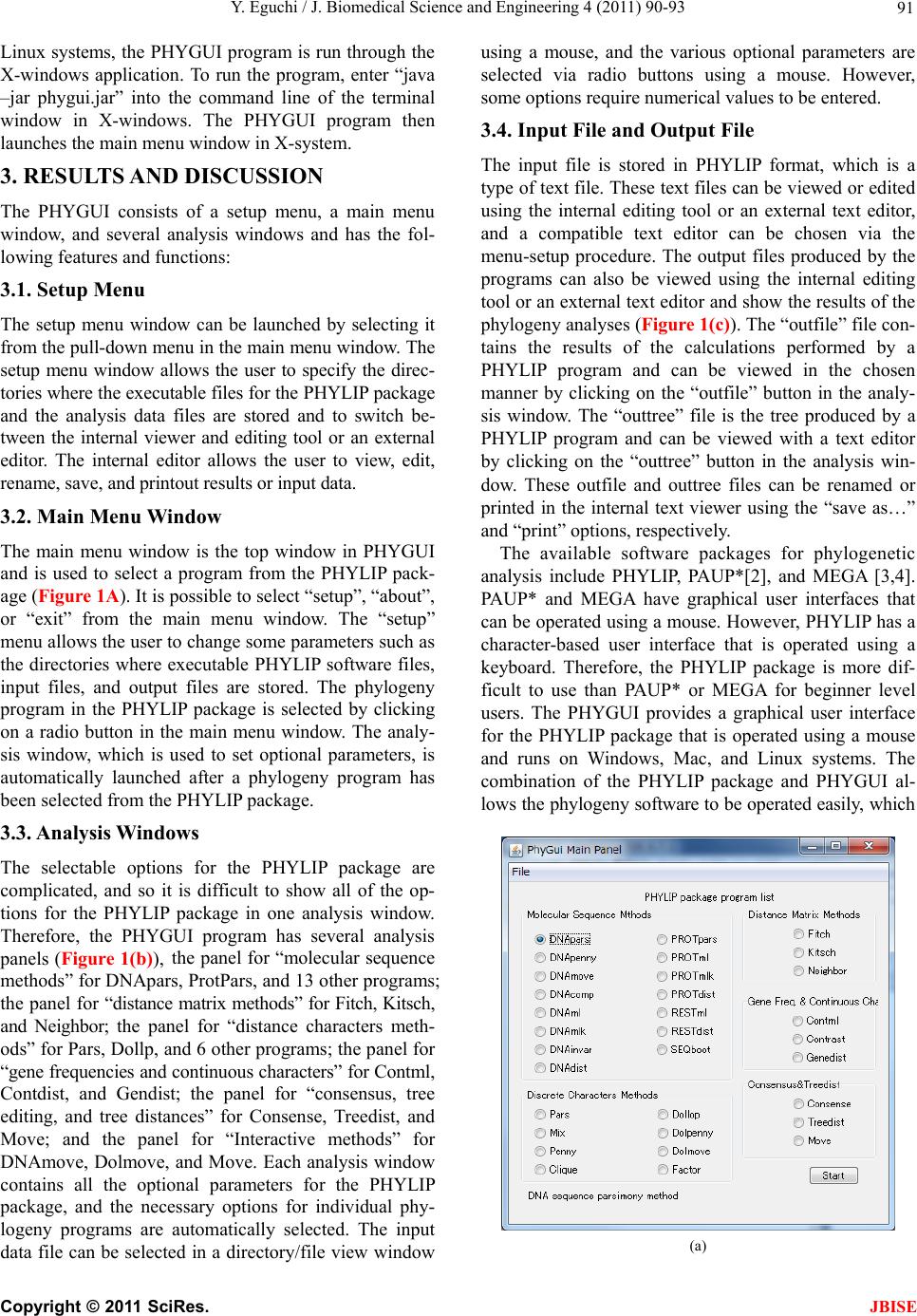 Y. Eguchi / J. Biomedical Science and Engineering 4 (2011) 90-93 91 Linux systems, the PHYGUI prog ram is run through the X-windows application. To run the program, enter “java –jar phygui.jar” into the command line of the terminal window in X-windows. The PHYGUI program then launches the main menu window in X-system. 3. RESULTS AND DISCUSSION The PHYGUI consists of a setup menu, a main menu window, and several analysis windows and has the fol- lowing features and functions: 3.1. Setup Menu The setup menu window can be launched by selecting it from the pull-down menu in the main menu window. The setup menu window allows the user to specify the direc- tories where the executable files for the PHYLIP package and the analysis data files are stored and to switch be- tween the internal viewer and editing tool or an external editor. The internal editor allows the user to view, edit, rename, save, and pri ntout results or input data. 3.2. Main Menu Window The main menu window is the top window in PHYGUI and is used to select a program from the PHYLIP pack- age (Figure 1A). It is possible to select “setup”, “about”, or “exit” from the main menu window. The “setup” menu allows the user to change some parameters such as the directories where executable PHYLIP software files, input files, and output files are stored. The phylogeny program in the PHYLIP package is selected by clicking on a radio button in the main menu window. The analy- sis window, which is used to set optional parameters, is automatically launched after a phylogeny program has been selected from the PHYLIP package. 3.3. Analysis Windows The selectable options for the PHYLIP package are complicated, and so it is difficult to show all of the op- tions for the PHYLIP package in one analysis window. Therefore, the PHYGUI program has several analysis panels (Figure 1(b)), the panel for “molecular sequence methods” for DNApars, ProtPars, and 13 other programs; the panel f or “distance matrix methods” for Fitch, Kitsch, and Neighbor; the panel for “distance characters meth- ods” for Pars, Dollp, and 6 other programs; the panel for “gene frequencies and continuous characters” for Contml, Contdist, and Gendist; the panel for “consensus, tree editing, and tree distances” for Consense, Treedist, and Move; and the panel for “Interactive methods” for DNAmove, Dolmove, and Move. Each analysis window contains all the optional parameters for the PHYLIP package, and the necessary options for individual phy- logeny programs are automatically selected. The input data file can be selected in a directory/file view window using a mouse, and the various optional parameters are selected via radio buttons using a mouse. However, some opt i ons require numer i c al values to be en t ered. 3.4. Input File and Output File The input file is stored in PHYLIP format, which is a type of text file. These text files can be viewed or edited using the internal editing tool or an external text editor, and a compatible text editor can be chosen via the menu-setup procedure. The output files produced by the programs can also be viewed using the internal editing tool or an extern al text editor and show the resu lts of the phylogeny analyses (Figure 1(c)). The “outfile” f ile co n- tains the results of the calculations performed by a PHYLIP program and can be viewed in the chosen manner by clicking on the “outfile” button in the analy- sis window. The “outtree” file is the tree produced by a PHYLIP program and can be viewed with a text editor by clicking on the “outtree” button in the analysis win- dow. These outfile and outtree files can be renamed or printed in the internal text viewer using the “save as…” and “print” options, respectively. The available software packages for phylogenetic analysis include PHYLIP, PAUP*[2], and MEGA [3,4]. PAUP* and MEGA have graphical user interfaces that can be operated using a mouse. However, PHYLIP has a character-based user interface that is operated using a keyboard. Therefore, the PHYLIP package is more dif- ficult to use than PAUP* or MEGA for beginner level users. The PHYGUI provides a graphical user interface for the PHYLIP package that is operated using a mouse and runs on Windows, Mac, and Linux systems. The combination of the PHYLIP package and PHYGUI al- lows the phylogen y software to be operated easily, which (a) C opyright © 2011 SciRes. JBISE 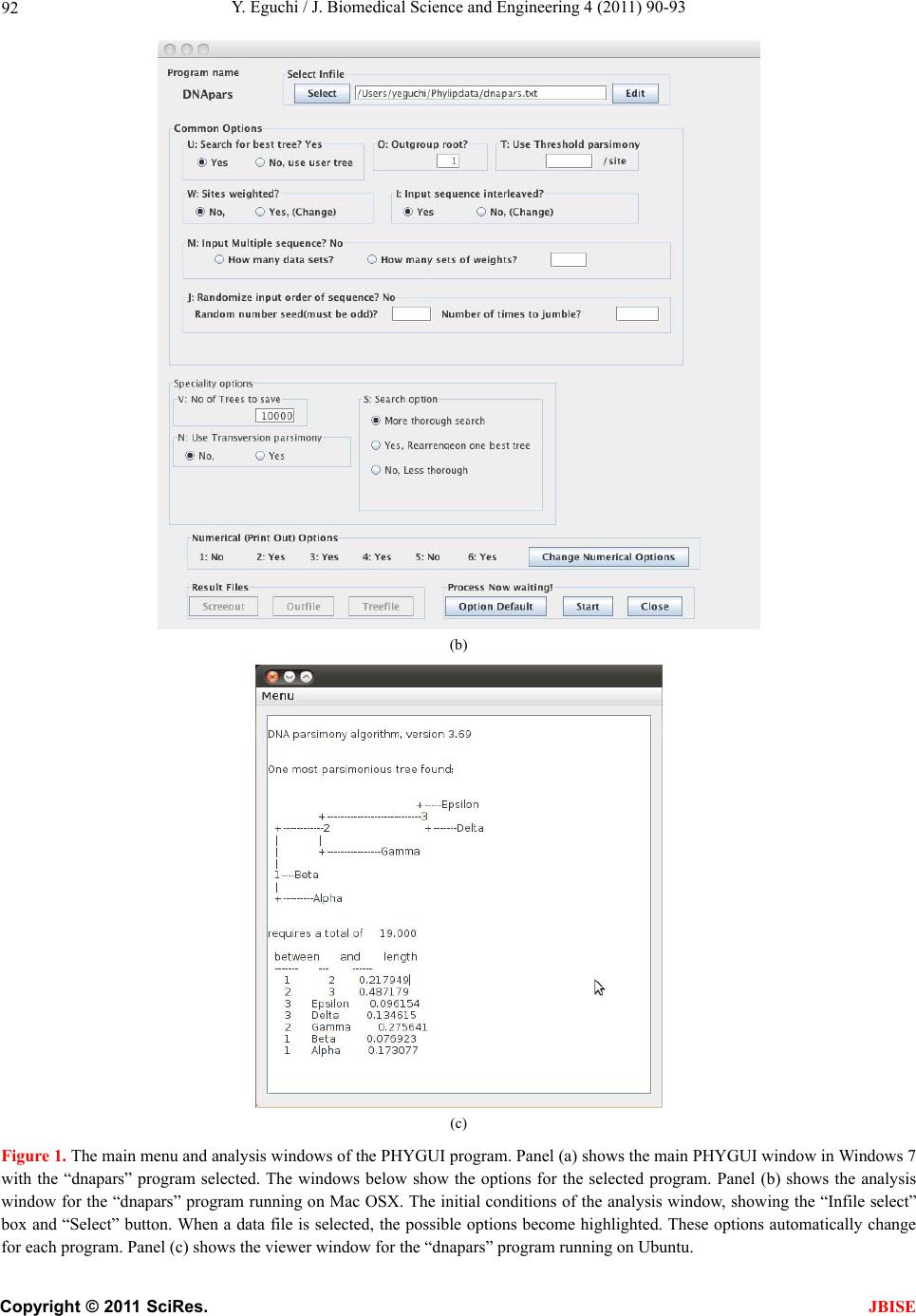 Y. Eguchi / J. Biomedical Science and Engineering 4 (2011) 90-93 Copyright © 2011 SciRes. JBISE 92 (b) (c) Figure 1. The main menu and analysis windows of the PHYGUI program. Panel (a) shows the main PHYGUI window in Windows 7 with the “dnapars” program selected. The windows below show the options for the selected program. Panel (b) shows the analysis window for the “dnapars” program running on Mac OSX. The initial conditions of the analysis window, showing the “Infile select” box and “Select” button. When a data file is selected, the possible options become highlighted. These options automatically change for each program. Panel (c) shows the viewer window for the “dnapars” program running on Ubuntu.  Y. Eguchi / J. Biomedical Science and Engineering 4 (2011) 90-93 93 is very useful for begi n ner s. In this paper, we used PHYLIP package version 3.68, which can be downloaded from the PHYLIP website (http://evolution.gs.washington.edu/phylip.html). The PHY- GUI interface is available by email on request from: [email protected] and can also be downloaded from the following website: http://wwwrlc.med.u-ryukyu.ac.jp/PHYGUI. REFERENCES [1] Felsenstein, J. (2005) PHYLIP (phylogeny inference package) version 3.6. Distributed by Author. Department of Genome Sciences, University of Washington, Seattle. http://evolution.genetics.washington.edu/phylip.html [2] Swofford, D.L. (2001) PAUP*: Phylogenetic analysis using parsimony and other methods. Sinauer Associates, Sunderland, MA. http://paup.csit.fsu.edu/ [3] Kumar, S., Dudley, J., Nei, M. and Tamura, K. (2008) MEGA: A biologist-centric software for evolutionary analysis of DNA and protein sequences. Briefings in Bioinformatics, 9, 299-306. doi:10.1093/bib/bbn017 [4] Tamura, K., Dudley, J., Nei, M. and Kumar, S. (2007) MEGA4: Molecular evolutionary genetics analysis (MEGA) software version 4.0. Molecular Biology and Evolution, 24, 1596-1599. doi:10.1093/molbev/msm092 C opyright © 2011 SciRes. JBISE |