

Paper Menu >>
Journal Menu >>
 E-Health Telecommunication Systems and Networks, 2013, 2, 65-71 Published Online December 2013 (http://www.scirp.org/journal/etsn) http://dx.doi.org/10.4236/etsn.2013.24009 Open Access ETSN Biomechanical Signals Human-Computer Interface for Severe Motor Disabilities Albano Carrera, Alonso A. Alonso, Ramón de la Rosa, Javier M. Aguiar Laboratory of Electronics and Bioengineering, Department of Signal Theory, Communications and Telematics Engineering, Higher Technical School of Telecommunications Engineering, Universidad de Valladolid, Valladolid, Spain Email: albano.carrera@uva.es, [email protected], ramros@tel.uva.es, [email protected] Received July 31, 2013; revised August 30, 2013; accepted September 20, 2013 Copyright © 2013 Albano Carrera et al. This is an open access article distributed under the Creative Commons Attribution License, which permits unrestricted use, distribution, and reproduction in any medium, provided the original work is properly cited. ABSTRACT A system that allows computer interaction by disabled people with very low mobility and who cannot use th e standard procedure based on keyboard and mouse is presented. The development device uses the patient’s voluntary biome- chanical signals, specifically, winks—which constitute an ability that gen erally remains in this k ind of patients—, as in- terface to control the computer. A prototype based on robust and low-cost elements has been built and its performance has been validated through real trials by 16 u sers without previous training. The system can be optimized after a learn- ing period in order to be adapted to every user. Also, good results were obtained in a subjective satisfaction su rvey that was completed by the users after carrying out the test trials. Keywords: Man-Machine Systems; Electronics; Medical Rehabilitation; Independent Livin g; Biomedical Engineering 1. Introduction The present paper is placed in the Rehabilitation Tech- nologies (RT) field, in particular in the human-machine interfaces’ development and its application to different systems with the aim of improving the quality of life and the personal autonomy of the disabled. Specifically, this work deals with the implementation of a human-com- puter interface for severe motor disabilities and those who cannot use the standard ways to control a computer, mouse and keyboard, due to their disability. Currently, there are several papers focused on the field of RT and on the development of adapted interfaces for the interaction with different devices. These interfaces should meet a set of requirements, which can be found in the related scientific literature, to ensure the best per- formance [1]. Due to the great diversity of interfaces that can be developed, a preliminary study of adaptation to the application of interest is necessary. Thus, a revision of the related scientific literature has been carried out, and different kinds of interfaces have been found: voice recognition [2], video camera-based systems [3], bio- electric signals, such as the electromyogram (EMG) or the electrooculogram (EOG), while performing voluntary movements [4], electroencephalogram (EEG) signals [5], residual movement detection withou t utilising bioelectric signals [6], inertial sensors [7] and autonomous interac- tion after activation [8]. Previous analysis carried out by the research group [1] advises and justifies the use of interfaces based on residual voluntary movement detec- tion without utilizing bioelectric signals for the tasks of command detection generated by users with severe motor disabilities. Focusing our attention on this kind of human-machine interfaces, the residual voluntary movement detection without utilizing b ioelectric signals, a few projects based on the registration of different gestures or corporal move- ments can be found: movements of the head [9], winks combined with movements of the head [10], movements of the tongue [11], sniffing [12] and posture changes [13]. Among the above mentioned options, wink detection has been considered the most adequate because this ability prevails in most of the severe motor disability cases and it is the gesture that interferes less with the normal daily activity of the subject. The interfaces mentioned above have been utilised for the control of RT systems, such as electric wheelchairs [1,14], surveillance systems [1] and, also, personal com- puters [3]. In this paper, the interfaces employed to con- trol personal computers are of special interest and there are articles that refer to interfaces that use movements of 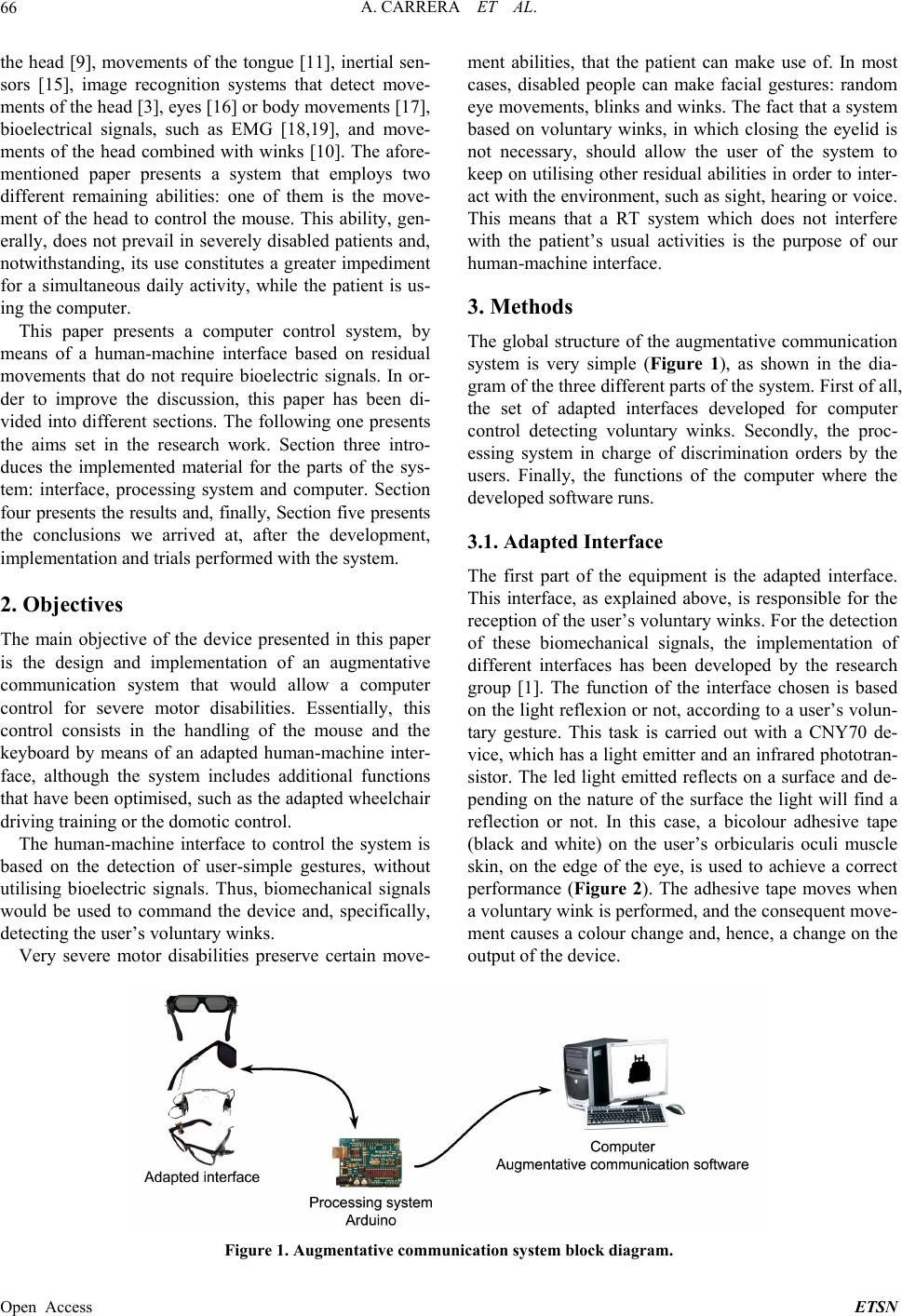 A. CARRERA ET AL. 66 the head [9], movements of the tongue [11], inertial sen- sors [15], image recognition systems that detect move- ments of the head [3], eyes [16] or body movements [17], bioelectrical signals, such as EMG [18,19], and move- ments of the head combined with winks [10]. The afore- mentioned paper presents a system that employs two different remaining abilities: one of them is the move- ment of the head to control the mouse. This ability, gen- erally, does not prevail in severely disabled patients and, notwithstanding, its use constitutes a greater impediment for a simultaneous daily activity, while the patient is us- ing the computer. This paper presents a computer control system, by means of a human-machine interface based on residual movements that do not require bioelectric signals. In or- der to improve the discussion, this paper has been di- vided into different sections. The following one presents the aims set in the research work. Section three intro- duces the implemented material for the parts of the sys- tem: interface, processing system and computer. Section four presents the results and, finally, Section five presents the conclusions we arrived at, after the development, implementation and trials performed with the system. 2. Objectives The main objective of the device presented in this paper is the design and implementation of an augmentative communication system that would allow a computer control for severe motor disabilities. Essentially, this control consists in the handling of the mouse and the keyboard by means of an adapted human-machine inter- face, although the system includes additional functions that have been optimised, such as the adapted wheelchair driving training or the domotic control. The human-machine interface to control the system is based on the detection of user-simple gestures, without utilising bioelectric signals. Thus, biomechanical signals would be used to command the device and, specifically, detecting the user’s voluntary winks. Very severe motor disabilities preserve certain move- ment abilities, that the patient can make use of. In most cases, disabled people can make facial gestures: random eye movements, blinks and winks. The fact that a system based on voluntary winks, in which closing the eyelid is not necessary, should allow the user of the system to keep on utilising other residual abilities in order to inter- act with the environment, such as sight, hearing or voice. This means that a RT system which does not interfere with the patient’s usual activities is the purpose of our human-machine interface. 3. Methods The global structure of the augmentative communication system is very simple (Figure 1), as shown in the dia- gram of the three different parts of the system. First of all, the set of adapted interfaces developed for computer control detecting voluntary winks. Secondly, the proc- essing system in charge of discrimination orders by the users. Finally, the functions of the computer where the developed so ft ware runs. 3.1. Adapted Interface The first part of the equipment is the adapted interface. This interface, as explained above, is responsible for the reception of the user’s voluntary winks. For the detection of these biomechanical signals, the implementation of different interfaces has been developed by the research group [1]. The function of the interface chosen is based on the light reflexion or not, according to a user’s volun- tary gesture. This task is carried out with a CNY70 de- vice, which has a light emitter and an infrared phototran- sistor. The led light emitted reflects on a surface and de- pending on the nature of the surface the light will find a reflection or not. In this case, a bicolour adhesive tape (black and white) on the user’s orbicularis oculi muscle skin, on the edge of the eye, is used to achieve a correct performance (Figure 2). The adhesive tape moves when a voluntary wink is performed, and the consequent move- ment causes a colour change and, hence, a change on the output of the device. Figure 1. Augmentative communication system block diagram. Open Access ETSN 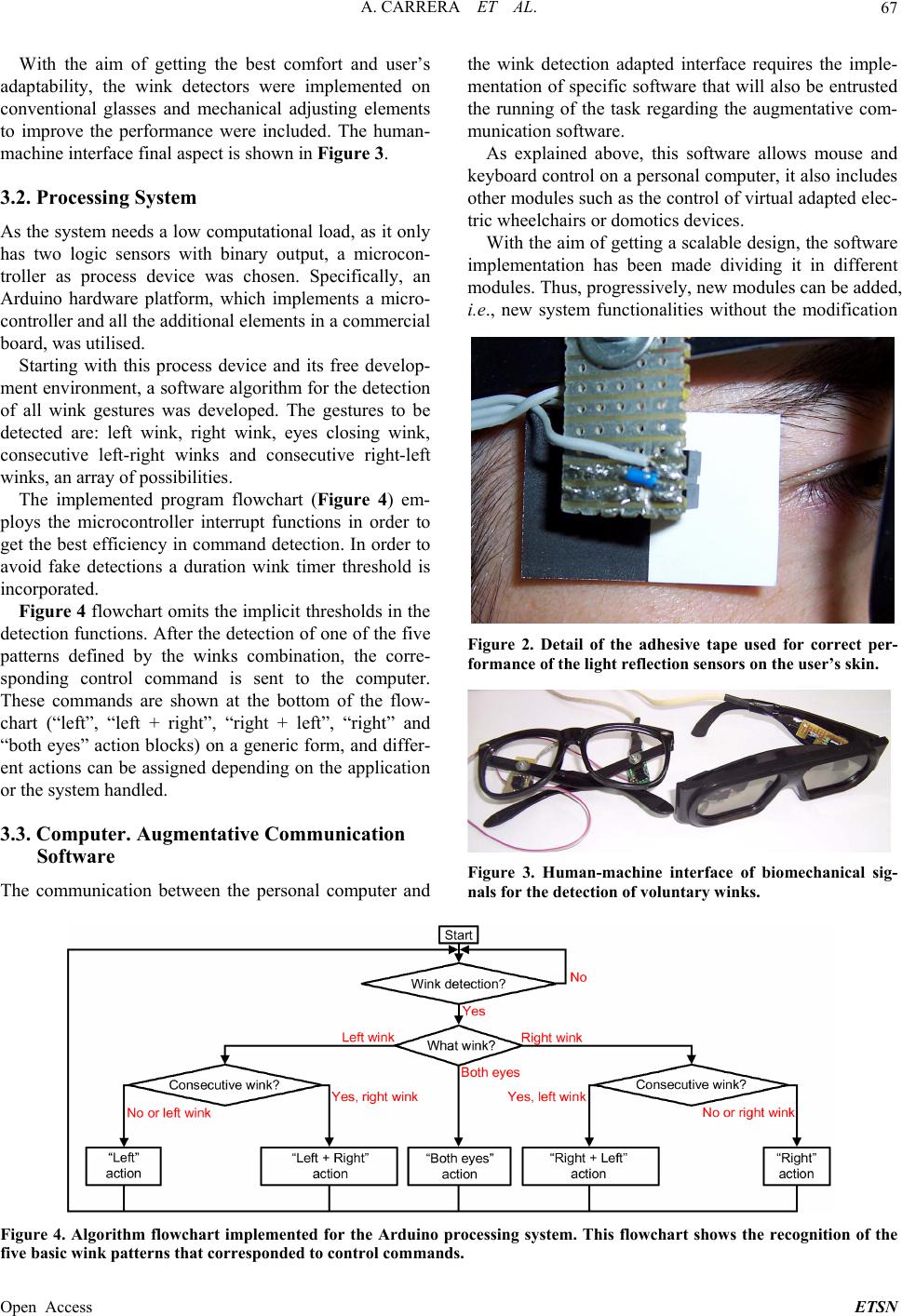 A. CARRERA ET AL. 67 With the aim of getting the best comfort and user’s adaptability, the wink detectors were implemented on conventional glasses and mechanical adjusting elements to improve the performance were included. The human- machine interface final aspect is shown in Figure 3. 3.2. Processing System As the system needs a low computational load, as it only has two logic sensors with binary output, a microcon- troller as process device was chosen. Specifically, an Arduino hardware platform, which implements a micro- controller and all the additional elements in a commercial board, was utilised. Starting with this process device and its free develop- ment environment, a software algorithm for the detection of all wink gestures was developed. The gestures to be detected are: left wink, right wink, eyes closing wink, consecutive left-right winks and consecutive right-left winks, an array of possibilities. The implemented program flowchart (Figure 4) em- ploys the microcontroller interrupt functions in order to get the best efficiency in command detection. In order to avoid fake detections a duration wink timer threshold is incorporated. Figure 4 flowchart omits the implicit thresholds in the detection functions. After the detection of one of the five patterns defined by the winks combination, the corre- sponding control command is sent to the computer. These commands are shown at the bottom of the flow- chart (“left”, “left + right”, “right + left”, “right” and “both eyes” action blocks) on a generic form, and differ- ent actions can be assigned depending on the application or the system handled. 3.3. Computer. Augmentative Communication Software The communication between the personal computer and the wink detection adapted interface requires the imple- mentation of specific software that will also be entrusted the running of the task regarding the augmentative com- munication software. As explained above, this software allows mouse and keyboard control on a personal computer, it also includes other modules such as the control of virtual adapted elec- tric wheelchairs or domotics devices. With the aim of getting a scalable design, the software implementation has been made dividing it in different modules. Thus, progressively, new modules can be added, i.e., new system functionalities without the modification Figure 2. Detail of the adhesive tape used for correct per- formance of the light reflection sensors on the user’s skin. Figure 3. Human-machine interface of biomechanical sig- nals for the detection of voluntary winks. Figure 4. Algorithm flowchart implemented for the Arduino processing system. This flowchart shows the recognition of the ive basic wink patterns that corresponded to control commands. f Open Access ETSN 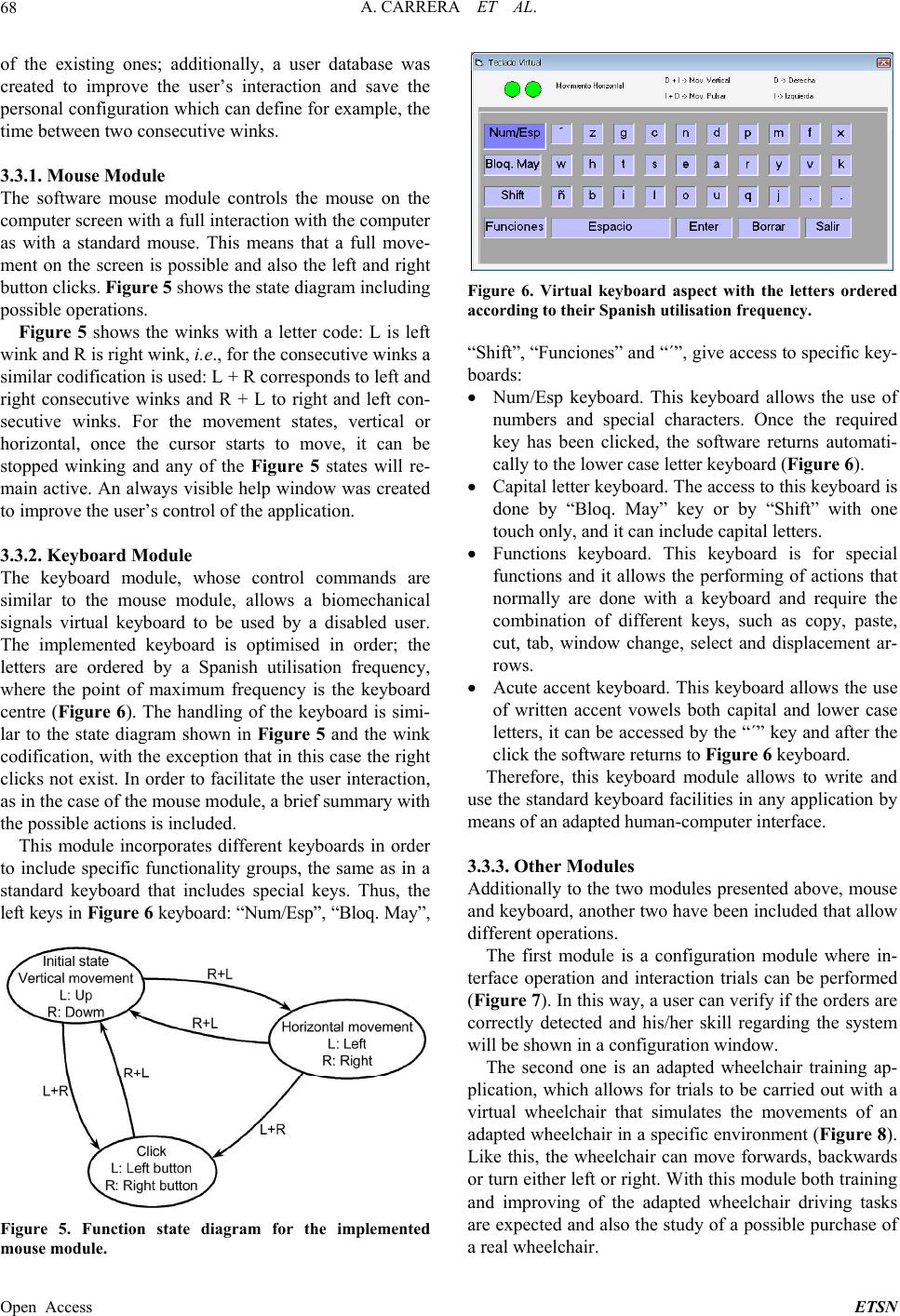 A. CARRERA ET AL. 68 of the existing ones; additionally, a user database was created to improve the user’s interaction and save the The software mouse module controls the mouse on the full interaction with the computer ink, i.e., for the consecutive winks a si The keyboard module, whose control commands a ule, allows a biomechanical groups, the same as in a st personal configuration which can define for example, the time between two consecutive winks. 3.3.1. Mouse Mo d ule computer screen with a as with a standard mouse. This means that a full move- ment on the screen is possible and also the left and right button clicks. Figure 5 shows the state diagram including possible ope rations. Figure 5 shows the winks with a letter code: L is left wink and R is right w milar codification is used: L + R corresponds to left and right consecutive winks and R + L to right and left con- secutive winks. For the movement states, vertical or horizontal, once the cursor starts to move, it can be stopped winking and any of the Figure 5 states will re- main active. An always visible help window was created to improve the user’s control of the application. 3.3.2. Keyboa r d Mod ul e re similar to the mouse mod signals virtual keyboard to be used by a disabled user. The implemented keyboard is optimised in order; the letters are ordered by a Spanish utilisation frequency, where the point of maximum frequency is the keyboard centre (Figure 6). The handling of the keyboard is simi- lar to the state diagram shown in Figure 5 and the wink codification, with the ex ception that in this case the right clicks not exist. In order to facilitate the user interaction, as in the case of the mouse module, a brief summary with the possible actions is included. This module incorporates different keyboards in order to include specific functionality andard keyboard that includes special keys. Thus, the left keys in Fig ure 6 keyboard: “Num/Esp”, “Bloq. May”, Figure 6. Virtual keyboard aspect with the letters ordered according to their Spanish utilisation frequency. “Shift”, “Funciones” and “´”, give access to specific key the use of numbers and special characters. Once the required to the lower case letter keyboard (Figure 6). ial y, paste, e software returns to Figure 6 keyboard. 3. at allow different operations. configuration module where in- d his/her skill regarding the system w Figure 8). Li - boards: Num/Esp keyboard. This keyboard allows key has been clicked, the software returns automati- cally Capital letter keyboard. The access to this k eyboard is done by “Bloq. May” key or by “Shift” with one touch only, and it can includ e capital letters. Functions keyboard. This keyboard is for spec functions and it allows the performing of actions that normally are done with a keyboard and require the combination of different keys, such as cop cut, tab, window change, select and displacement ar- rows. Acute accent keyboard. This keyboard allows the use of written accent vowels both capital and lower case letters, it can be accessed by the “´” key and after the click th Therefore, this keyboard module allows to write and use the standard keyboard facilities in any application by means of an adapted human-computer interface. 3.3. Other Modules Additionally to the two modules presented above, mouse and keyboard, another two have been included th The first module is a terface operation and interaction trials can be performed (Figure 7). In this way, a user can verify if the orders are correctly detected an ill be shown in a configuration window. The second one is an adapted wheelchair training ap- plication, which allows for trials to be carried out with a virtual wheelchair that simulates the movements of an adapted wheelchair in a specific environment ( ke this, the wheelchair can move forwards, backwards or turn either left or right. With this module both training and improving of the adapted wheelchair driving tasks are expected and also the study of a possible purchase of a real wheelchair. Figure 5. Function state diagram for the implemented mouse module. Open Access ETSN 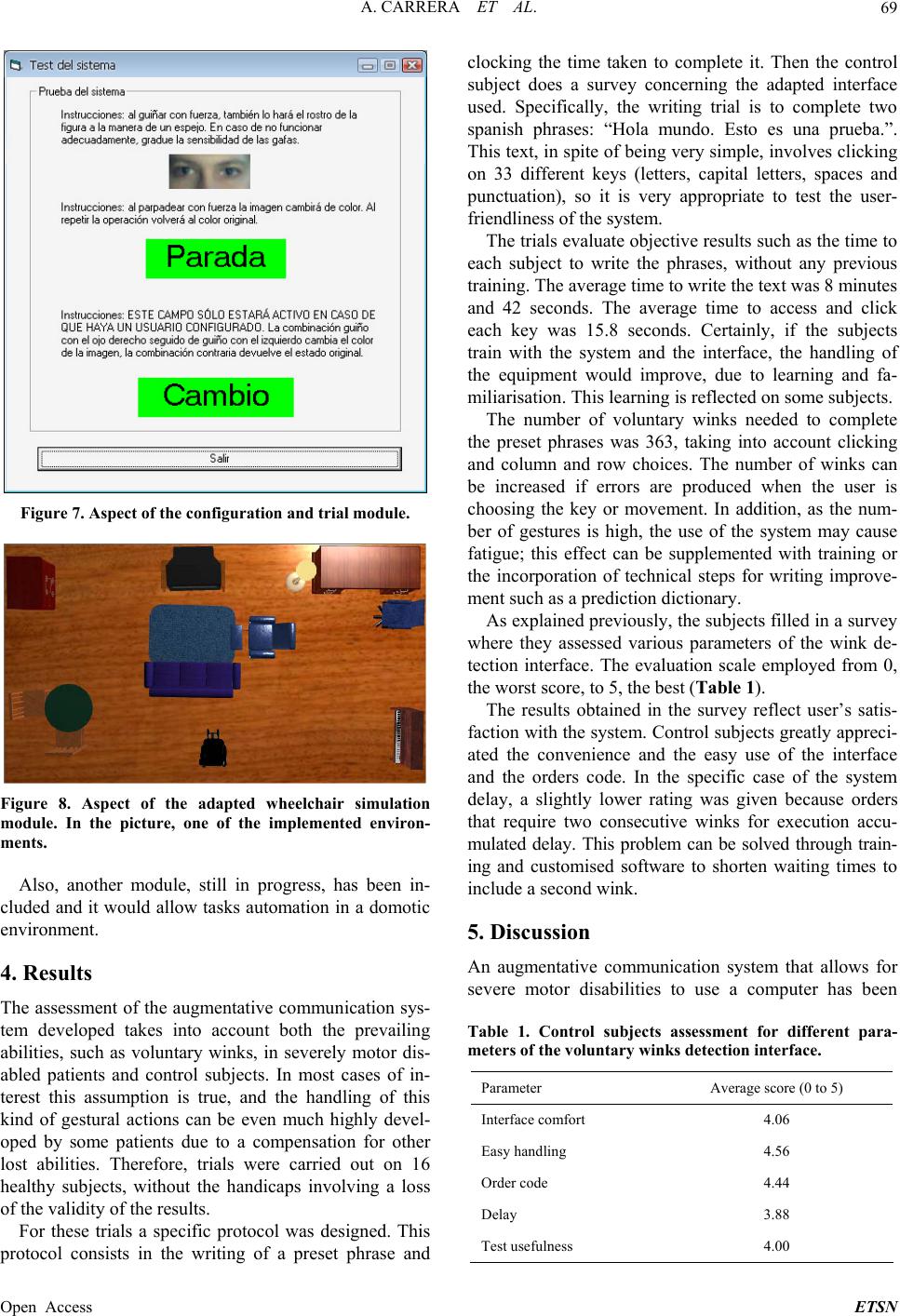 A. CARRERA ET AL. 69 Figure 7. Aspect of the configuration and trial module. Figure 8. Aspect of the adapted wheelchair simulation module. In the picture, one of the implemented environ- ments. ment. 4. es into account both the prevailing as voluntary winks, in severely motor dis- and control subjects. In most cases of in- rning the adapted interface us age time to access and click ea ch ). e of the system de es to use a computer has been subjects assessment for different para- Also, another module, still in progress, has been in- cluded and it would allow tasks automation in a domotic environ Results The assessment of the augmentative communication sys- tem developed tak abilities, such abled patients terest this assumption is true, and the handling of this kind of gestural actions can be even much highly devel- oped by some patients due to a compensation for other lost abilities. Therefore, trials were carried out on 16 healthy subjects, without the handicaps involving a loss of the validity of the results. For these trials a specific protocol was designed. This protocol consists in the writing of a preset phrase and clocking the time taken to complete it. Then the control subject does a survey conce ed. Specifically, the writing trial is to complete two spanish phrases: “Hola mundo. Esto es una prueba.”. This text, in spite of being very simple, involves clicking on 33 different keys (letters, capital letters, spaces and punctuation), so it is very appropriate to test the user- friendliness of the system. The trials evaluate objective results such as the time to each subject to write the phrases, without any previous training. The average time to write the text was 8 minutes and 42 seconds. The aver ch key was 15.8 seconds. Certainly, if the subjects train with the system and the interface, the handling of the equipment would improve, due to learning and fa- miliarisation. This learning is reflected on some subjects. The number of voluntary winks needed to complete the preset phrases was 363, taking into account clicking and column and row choices. The number of winks can be increased if errors are produced when the user is oosing the key or movement. In addition, as the num- ber of gestures is high, the use of the system may cause fatigue; this effect can be supplemented with training or the incorporation of technical steps for writing improve- ment such as a prediction dictionary. As explained previously, th e subjects filled in a surv ey where they assessed various parameters of the wink de- tection interface. The evaluation scale employed from 0, the worst score, to 5, the best (Table 1 The results obtained in the survey reflect user’s satis- faction with the system. Control subjects greatly appr eci- ated the convenience and the easy use of the interface and the orders code. In the specific cas lay, a slightly lower rating was given because orders that require two consecutive winks for execution accu- mulated delay. This problem can be solved through train- ing and customised software to shorten waiting times to include a second wink. 5. Discussion An augmentative communication system that allows for severe motor disabiliti Table 1. Control meters of the voluntary winks detection interface. Parameter Average score (0 to 5) Interface comfort 4.06 Easy handling 4.56 Order code 4.44 Delay 3.88 Test usefulness 4.00 Open Access ETSN 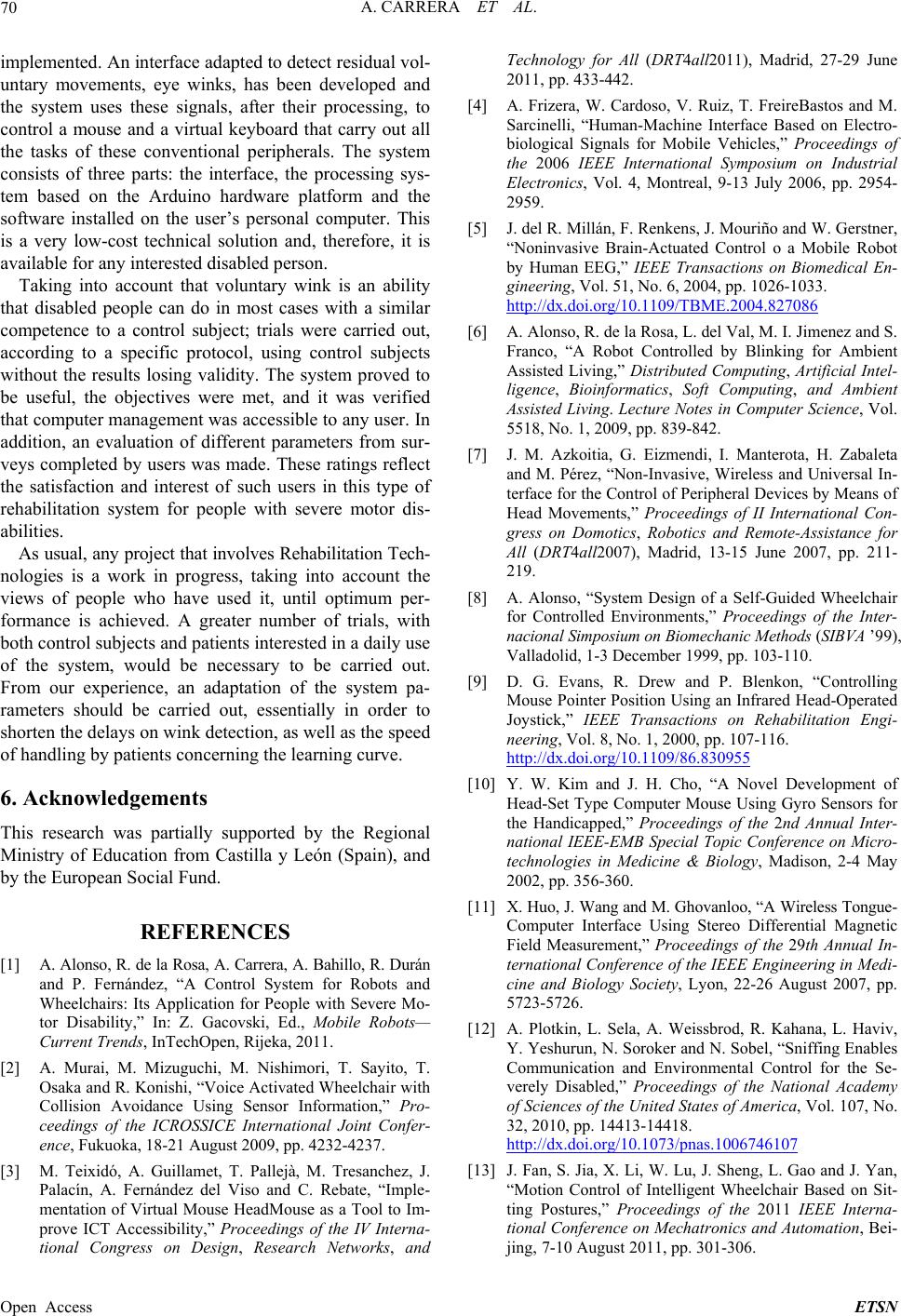 A. CARRERA ET AL. 70 im d. An interface adapted to detect residual untovements, eye winks, has beeveloped and the system uses these signals, after thcessing, to ce and a virtual keyboard carry out all nd trol System for Robots and Wheelchairs: Its Application for People with Severe Mo- tor Disability,, Mobile Robots— Current Trend011. -4237. and 13 July 2006, pp. 2954- x.doi.org/10.1109/TBME.2004.827086 plementevol- Technology for All (DRT4all2011), Madrid, 27-29 June 2011, pp. 433-442. [4] A. Frizera, W. Cardoso, V. Ruiz, T. FreireBastos and M. Sarcinelli, “Human-Machine Interface Based on Electro- biological Signals for Mobile Vehicles,” Proceedings of the 2006 IEEE International Symposium on Industrial Electronics, Vol. 4, Montreal, 9- ary mn de eir pro ontrol a mous that the tasks of these conventional peripherals. The system consists of three parts: the interface, the processing sys- tem based on the Arduino hardware platform and the software installed on the user’s personal computer. This is a very low-cost technical solution and, therefore, it is available for any interested disabled person. Taking into account that voluntary wink is an ability that disabled people can do in most cases with a similar competence to a control subject; trials were carried out, according to a specific protocol, using control subjects without the results losing validity. The system proved to be useful, the objectives were met, and it was verified that computer management was accessible to any user. In addition, an evaluation of different parameters from sur- veys completed by users was made. These ratings reflect the satisfaction and interest of such users in this type of rehabilitation system for people with severe motor dis- abilities. As usual, any project that involves Rehabilitation Tech- nologies is a work in progress, taking into account the views of people who have used it, until optimum per- formance is achieved. A greater number of trials, with both control subjects and patients interested in a daily use of the system, would be necessary to be carried out. From our experience, an adaptation of the system pa- rameters should be carried out, essentially in order to shorten the delays on wink detection, as well as the speed of handling by patients concerning the learning curve. 6. Acknowledgements This research was partially supported by the Regional Ministry of Education from Castilla y León (Spain), a by the European Social Fund. REFERENCES [1] A. Alonso, R. de la Rosa, A. Carrera, A. Bahillo, R. Durán and P. Fernández, “A Con ” In: Z. Gacovski, Ed. s, InTechOpen, Rijeka, 2 [2] A. Murai, M. Mizuguchi, M. Nishimori, T. Sayito, T. Osaka and R. Konishi, “Voice Activated Wheelchair with Collision Avoidance Using Sensor Information,” Pro- ceedings of the ICROSSICE International Joint Confer- ence, Fukuoka, 18-21 August 2009, pp. 4232 [3] M. Teixidó, A. Guillamet, T. Pallejà, M. Tresanchez, J. Palacín, A. Fernández del Viso and C. Rebate, “Imple- mentation of Virtual Mouse HeadMouse as a Tool to Im- prove ICT Accessibility,” Proceedings of the IV Interna- tional Congress on Design, Research Networks, 2959. [5] J. del R. Millán, F. Renkens, J. Mouriño and W. Gerstner, “Noninvasive Brain-Actuated Control o a Mobile Robot by Human EEG,” IEEE Transactions on Biomedical En- gineering, Vol. 51, No. 6, 2004, pp. 1026-1033. http://d mbient ence, Vol. d Remote-Assistance for [6] A. Alonso, R. de la Rosa, L. del Val, M. I. Jimenez and S. Franco, “A Robot Controlled by Blinking for Ambient Assisted Living,” Distributed Computing, Artificial Intel- ligence, Bioinformatics, Soft Computing, and A Assisted Living. Lecture Notes in Computer Sci 5518, No. 1, 2009, pp. 839-842. [7] J. M. Azkoitia, G. Eizmendi, I. Manterota, H. Zabaleta and M. Pérez, “Non-Invasive, Wireless and Universal In- terface for the Control of Peripheral Devices by Means of Head Movements,” Proceedings of II International Con- gress on Domotics, Robotics an All (DRT4all2007), Madrid, 13-15 June 2007, pp. 211- 219. [8] A. Alonso, “System Design of a Self-Guided Wheelchair for Controlled Environments,” Proceedings of the Inter- nacional Simposium on Biomechanic Method s (SIBVA ’99), Valladolid, 1-3 December 1999, pp. 103-110. [9] D. G. Evans, R. Drew and P. Blenkon, “Controlling Mouse Pointer Position Using an Infrared Head-Operated Joystick,” IEEE Transactions on Rehabilitation Engi- neering, Vol. 8, No. 1, 2000, pp. 107-116. http://dx.doi.org/10.1109/86.830955 [10] Y. W. Kim and J. H. Cho, “A Novel Development of Head-Set Type Computer Mouse Using Gyro Sensors for the Handicapped,” Proceedings of the 2nd Annual Inter- national IEEE-EMB Special Topic Conferen technologies in Medicine & Biologyce on Micro- , Madison, 2-4 May ciety, Lyon, 22-26 August 2007, pp. f the United States of America, Vol. 107, No. 2002, pp. 356-360. [11] X. Huo, J. Wang and M. Ghovanloo, “A Wireless Tongue- Computer Interface Using Stereo Differential Magnetic Field Measurement,” Proceedings of the 29th Annual In- ternational Conference of the IEEE Engineering in Medi- cine and Biology So 5723-5726. [12] A. Plotkin, L. Sela, A. Weissbrod, R. Kahana, L. Haviv, Y. Yeshurun, N. Soroker and N. Sobel, “Sniffing Enables Communication and Environmental Control for the Se- verely Disabled,” Proceedings of the National Academy of Sciences o 32, 2010, pp. 14413-14418. http://dx.doi.org/10.1073/pnas.1006746107 [13] J. Fan, S. Jia, X. Li, W. Lu, J. Sheng, L. Gao and J. Yan, “Motion Control of Intelligent Wheelchair Based on Sit- ting Postures,” Proceedings of the 2011 IEEE Interna- tional Conference on Mechatronics and Aut jing, 7-10 August 2011, pp. 301-306. omation, Bei- Open Access ETSN  A. CARRERA ET AL. Open Access ETSN 71 http://dx.doi.org/10.1109/ICMA.2011.5985674 [14] J. M. Ford and S. J. Sheredos, “Ultrasonic Head Control- ler for Powered Wheelchairs,” Journal of Rehabilitation Research & Development, Vol. 32, No. 3, 1995, pp. 280- 284. [15] Y. W. Kim, “Development of Headset-Type Computer Mouse Using Gyro Sensors for the Handicapped,” Elec- tronics Letters, Vol. 38, No. 22, 2002, pp. 1313-1314. http://dx.doi.org/10.1049/el:20020950 [16] A. De Santis and D. Iacoviello, “Robust Real Time Eye Tracking for Computer Interface for Disabled People,” Computer Methods and Programs in Biomedicine, Vol. 96, No. 1, 2009, pp. 1-11. http://dx.doi.org/10.1016/j.cmpb.2009.03.010 [17] M. Betke, P. Gips and P. Fleming, “The Camera Mouse: Visual Tracking of Body Features to Provide Computer Access for People with Severe Disabilities,” IEEE Trans- actions on Neural Systems and Rehabilitation Engineer- ing, Vol. 10, No. 1, 2002, pp. 1534-4320. http://dx.doi.org/10.1109/TNSRE.2002.1021581 [18] R. Barea, L. Boquete, J. M. Rodriguez-Ascariz, S and E. López, “Sensory System for Implementing a . Ortega Hu- man-Computer Interface Based on Electrooculography,” Sensors (Basel), Vol. 11, No. 1, 2011, pp. 310-328. http://dx.doi.org/10.3390/s110100310 [19] M. Yoshida, T. Itou and J. Nagata, “Developmen EMG controlled mouse cursor,” Proceedings t of of the Sec- ond Joint EMBS-BMES, 24th Annual International Con- ference of the Engineering in Medicine and Biology Soci- ety, Annual Fall Meeting of the Biomedical Engineering Society, Vol. 3, Houston, 23-26 October 2002, p. 2436. |