

Paper Menu >>
Journal Menu >>
 Optics and Photonics Journal, 2013, 3, 331-336 doi:10.4236/opj.2013.32B076 Published Online June 2013 (http://www.scirp.org/journal/opj) Holographic Raman Tweezers Controlled by Hand Gestures and Voice Commands Zoltan Tomori1, Marian Antalik1,2, Peter Kesa2, Jan Kanka3, Petr Jakl3, Mojmir Sery3, Silvie Bernatova3, Pavel Zemanek3 1Department of Biophysics, Institute of Experimental Physics SAS, Kosice, Slovakia 2Department of Biochemistry, P. J. Safarik University, Kosice, Slovakia 3Institute of Scientific Instruments of the ASCR v.v.i., Brno, Czech Republic Email: [email protected] Received 2013 ABSTRACT Several attempts have appeared recently to control optical trapping systems via touch tablets and cameras instead of a mouse and joystick. Our approach is based on a modern low-cost hardware combined with fingertips and speech recog- nition software. Positions of operator's hands or fingertips control the positions of trapping beams in holographic optical tweezers that provide optical manipulation with microobjects. We tested and adapted two systems for hands position detection and gestures recognition – Creative Interactive Gesture Camera and Leap Motion. We further enhanced the system of Holographic Raman tweezers (HRT) by voice commands controlling the micropositioning stage and acquisi- tion of Raman spectra. Interface communicates with HRT either directly by which requires adaptatio n of HRT firmware, or indirectly by simulating mou se and keyboard messages. Its utilization in real exp eriments speeded up the op erator’s communication with the system cca. Two times in comparison with the traditional control by the mouse and the key- board. Keywords: Holographic Optical Tweezers; Raman Tweezers; Natural User Interface; Leap Motion; Gesture Camera 1. Introduction Optical tweezers represent a tool that uses a tightly fo- cused laser beam for contactless three-dimensional ma- nipulation with electrically neutral objects of sizes from tens of nanometers to tens of micrometers [1]. An object is trapped near the focus of the laser beam and reposi- tioning of the beam focus is followed by the object movement to the new beam focus position. The human operator usually controls the position of the trapping beam by a traditional pointing device like mouse or joy- stick. Some research groups have used 3D joystick and haptic devices [2]. Manipulation with more objects needs more independent trapping beams that can be obtained by several different methods. The most flexible one uses a spatial light modulator that splits one beam into more beams with independently positioned foci in all three dimensions. Such holographic optical tweezers [3] can be easily controlled by PC and in co mbinatio n with a system detecting position of manipulated objects provides the bases for efficient feedback control. For example, a CCD camera with appropriate software detects the position of each finger and transforms it into controlled manipula- tion with several particles simultaneously [4]. In [5] this idea was modified into "Multi-touch console" which was a big horizontal board where several operators can work simultaneously. Natural consequence of the recent worldwide expansion of touch screen tablets was their exploitation to move the particles in th e XY plane, while the Z-axis coordinate is determined by zooming ("stretch- ing" particles between two fingers) [6]. The Microsoft Kinect sensor is able to capture 3D im- ages (X, Y, Z coordinates) and thus open s new possibili- ties to control optical trapping [7]. However, Kinect was primary designed to capture the whole human body and therefore the recognitio n of near objects (hand s of sitting person) is limited. The new generation of sensors (Crea- tive Interactive Gesture Camera, Leap Motion) allow to overcome this problem. They integrate several methods belonging to the quickly growing area of computer vision called "Natural User Interface" (NUI). Optical micromanipulation techniques can be easily combined with other techniques, such as force measure- ment (photonic force microscope) or Raman laser spec- troscopy (Raman tweezers), with rather complex control interface. NUI technology in these areas can significantly speed up the dwell-time between the action of th e opera- tor and the reaction of the system. Our proof-of-concept experiments combine the hand gestures recognition for Copyright © 2013 SciRes. OPJ 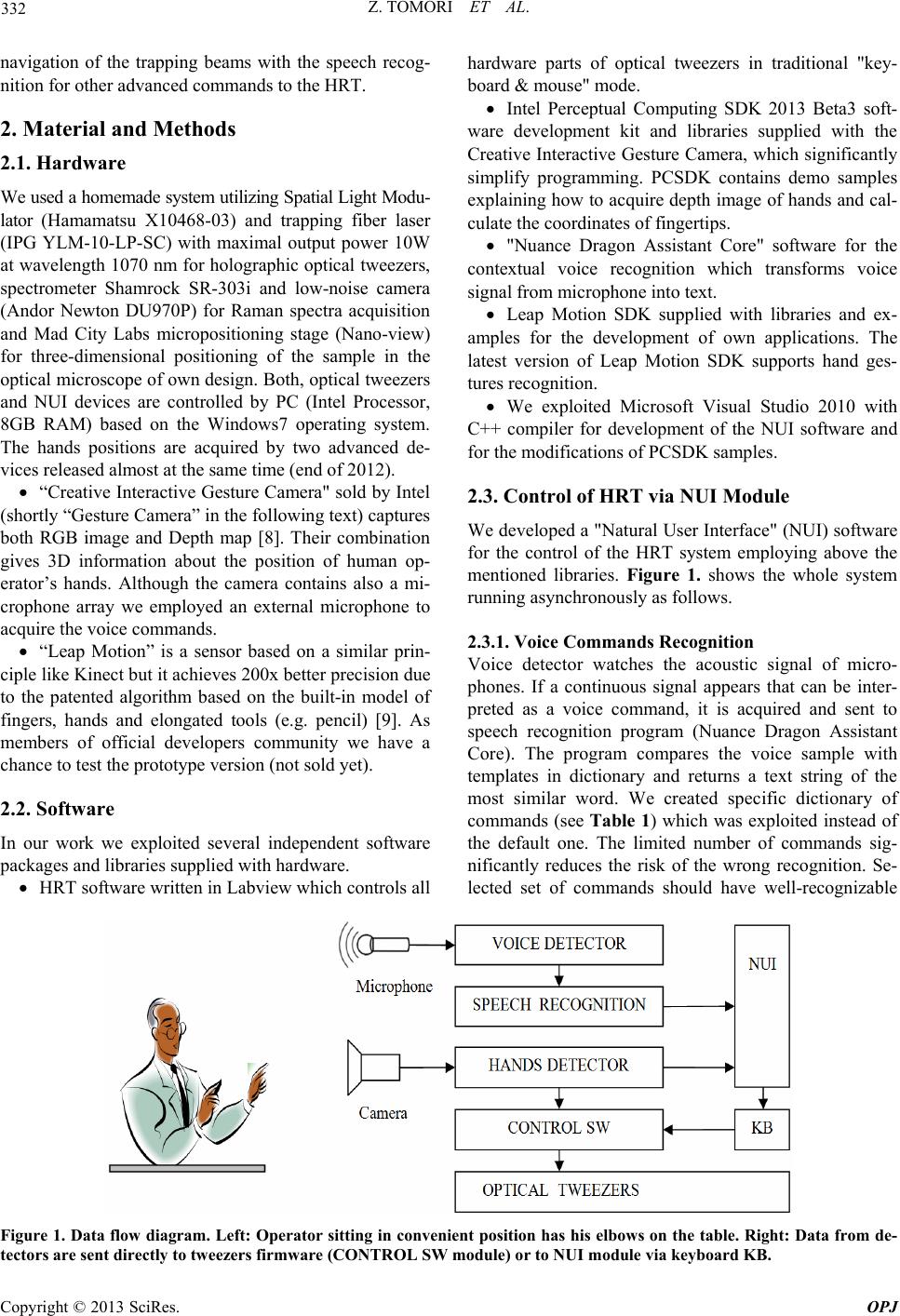 Z. TOMORI ET AL. 332 navigation of the trapping beams with the speech recog- nition for other advanced commands to the HRT. 2. Material and Methods 2.1. Hardware We used a homemade system utilizing Spatial Light Modu- lator (Hamamatsu X10468-03) and trapping fiber laser (IPG YLM-10-LP-SC) with maximal output power 10W at wavelength 1070 nm for holographic optical tweezers, spectrometer Shamrock SR-303i and low-noise camera (Andor Newton DU970P) for Raman spectra acquisition and Mad City Labs micropositioning stage (Nano-view) for three-dimensional positioning of the sample in the optical microscope of own design. Both, optical tweezers and NUI devices are controlled by PC (Intel Processor, 8GB RAM) based on the Windows7 operating system. The hands positions are acquired by two advanced de- vices released almost at the same time (end of 2012). “Creative Interactive Gesture Camera" sold by Intel (shortly “Gesture Camera” in the following text) captures both RGB image and Depth map [8]. Their combination gives 3D information about the position of human op- erator’s hands. Although the camera contains also a mi- crophone array we employed an external microphone to acquire the voice commands. “Leap Motion” is a sensor based on a similar prin- ciple like Kinect but it achieves 200x better precision due to the patented algorithm based on the built-in model of fingers, hands and elongated tools (e.g. pencil) [9]. As members of official developers community we have a chance to test the prototype version (not sold yet). 2.2. Software In our work we exploited several independent software packages and libraries supplied with hardware. HRT software written in Labview which controls all hardware parts of optical tweezers in traditional "key- board & mouse" mode. Intel Perceptual Computing SDK 2013 Beta3 soft- ware development kit and libraries supplied with the Creative Interactive Gesture Camera, which significantly simplify programming. PCSDK contains demo samples explaining how to acquire depth image of hands and cal- culate the coordinates of fingertips. "Nuance Dragon Assistant Core" software for the contextual voice recognition which transforms voice signal from microphone into text. Leap Motion SDK supplied with libraries and ex- amples for the development of own applications. The latest version of Leap Motion SDK supports hand ges- tures recognition. We exploited Microsoft Visual Studio 2010 with C++ compiler for development of the NUI software and for the modifications of PCSDK samples. 2.3. Control of HRT via NUI Module We developed a "Natural User Interface" (NUI) software for the control of the HRT system employing above the mentioned libraries. Figure 1. shows the whole system running asynchronously as follows. 2.3.1. Voice Commands Recognition Voice detector watches the acoustic signal of micro- phones. If a continuous signal appears that can be inter- preted as a voice command, it is acquired and sent to speech recognition program (Nuance Dragon Assistant Core). The program compares the voice sample with templates in dictionary and returns a text string of the most similar word. We created specific dictionary of commands (see Table 1) which was exploited instead of the default one. The limited number of commands sig- nificantly reduces the risk of the wrong recognition. Se- lected set of commands should have well-recognizable Figure 1. Data flow diagram. Left: Operator sitting in convenient position has his elbows on the table. Right: Data from de- tectors are sent directly to tweezers firmware (CONTROL SW module) or to NUI module via keyboard KB. Copyright © 2013 SciRes. OPJ 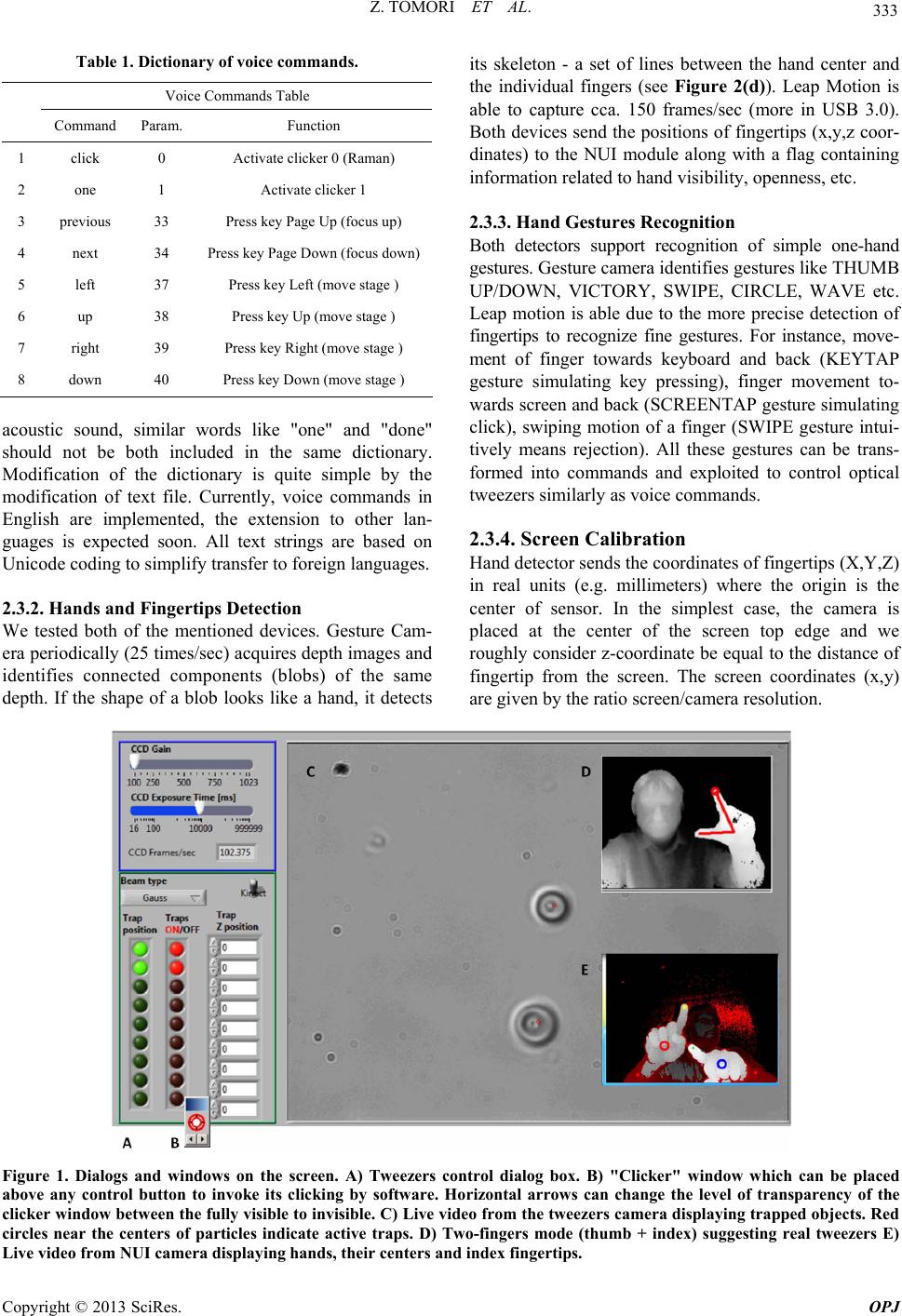 Z. TOMORI ET AL. 333 Table 1. Dictionary of voice commands. Voice Commands Table Command Param. Function 1 click 0 Activate clicker 0 (Raman) 2 one 1 Activate clicker 1 3 previous 33 Press key Page Up (focus up) 4 next 34 Press key Page Down (focus d own) 5 left 37 Press key Left (move stage ) 6 up 38 Press key Up (move sta ge ) 7 right 39 Press key Right (move stage ) 8 down 40 Press key Down (move stage ) acoustic sound, similar words like "one" and "done" should not be both included in the same dictionary. Modification of the dictionary is quite simple by the modification of text file. Currently, voice commands in English are implemented, the extension to other lan- guages is expected soon. All text strings are based on Unicode coding to simplify transfer to foreign languages. 2.3.2. H a n d s a n d Fi ngertips D e t e ction We tested both of the mentioned devices. Gesture Cam- era periodically (25 times/sec) acquires depth images and identifies connected components (blobs) of the same depth. If the shape of a blob looks like a hand, it detects its skeleton - a set of lines between the hand center and the individual fingers (see Figure 2(d)). Leap Motion is able to capture cca. 150 frames/sec (more in USB 3.0). Both devices send the positions of fingertips (x,y,z coor- dinates) to the NUI module along with a flag containing information related to hand visibility, openness, etc. 2.3.3. Hand Gestur es Recog nition Both detectors support recognition of simple one-hand gestures. Gesture camera identifies gestures like THUMB UP/DOWN, VICTORY, SWIPE, CIRCLE, WAVE etc. Leap motion is able due to the more precise detection of fingertips to recognize fine gestures. For instance, move- ment of finger towards keyboard and back (KEYTAP gesture simulating key pressing), finger movement to- wards screen and back (SCREENTAP gesture simulating click), swiping motion of a finger (SWIPE gesture intui- tively means rejection). All these gestures can be trans- formed into commands and exploited to control optical tweezers similarly as voice commands. 2.3.4. Screen Calibration Hand detector sends the coordinates of fingertips (X,Y,Z) in real units (e.g. millimeters) where the origin is the center of sensor. In the simplest case, the camera is placed at the center of the screen top edge and we roughly consider z-coordinate be equal to the distance of fingertip from the screen. The screen coordinates (x,y) are given by the ratio screen/camera resolution. Figure 1. Dialogs and windows on the screen. A) Tweezers control dialog box. B) "Clicker" window which can be placed above any control button to invoke its clicking by software. Horizontal arrows can change the level of transparency of the clicker window between the fully visible to invisible. C) Live video from the tweezers camera displaying trapped objects. Red circles near the centers of particles indicate active traps. D) Two-fingers mode (thumb + index) suggesting real tweezers E) Live video from NUI camera displaying hands, their centers and index fingertips. Copyright © 2013 SciRes. OPJ 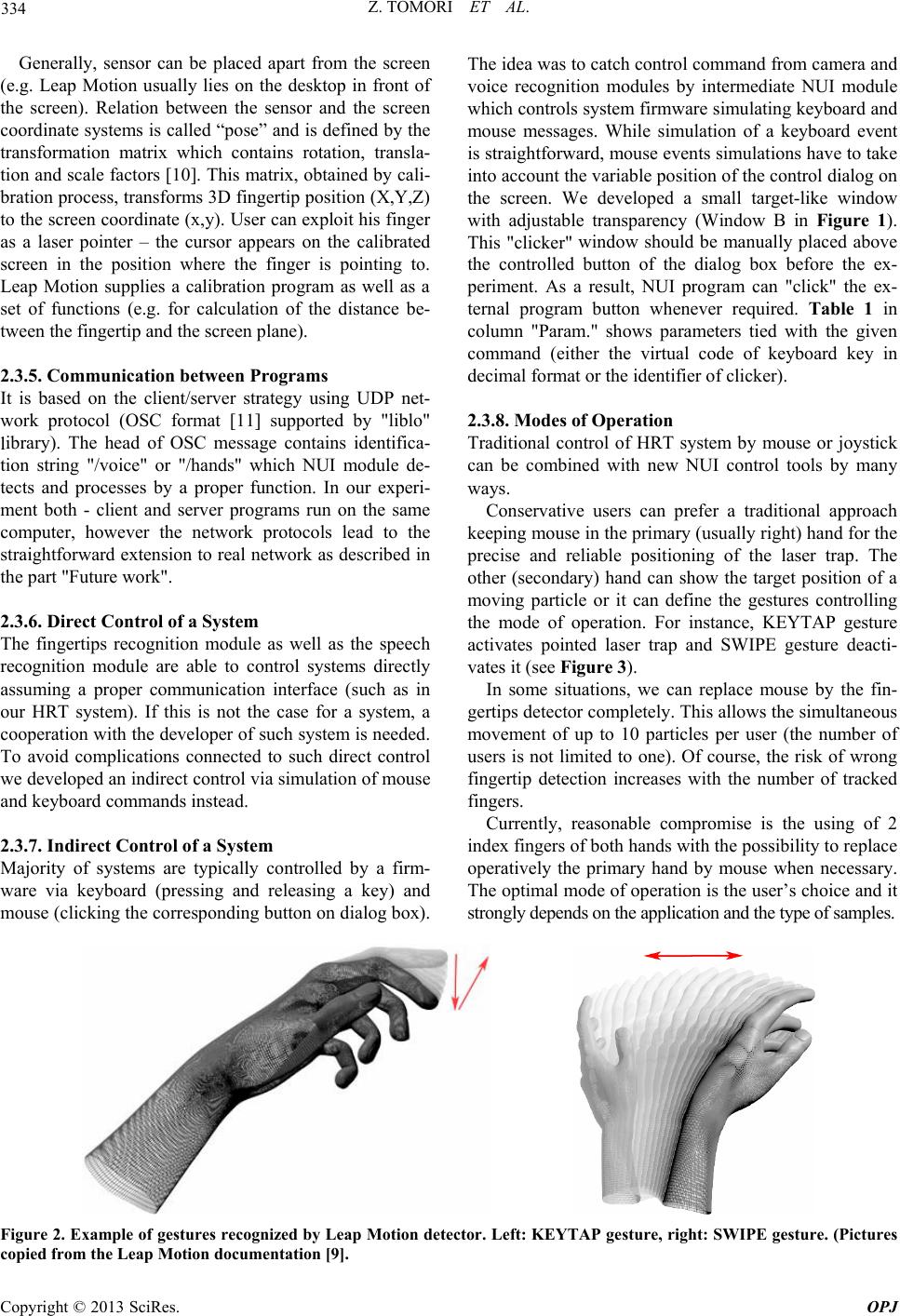 Z. TOMORI ET AL. 334 Generally, sensor can be placed apart from the screen (e.g. Leap Motion usually lies on the desktop in front of the screen). Relation between the sensor and the screen coordinate systems is called “pose” and is defined by the transformation matrix which contains rotation, transla- tion and scale factors [10]. This matrix, obtained by cali- bration process, transf orms 3D fingertip positio n (X,Y,Z) to the screen coordinate (x,y). User can exploit his finger as a laser pointer – the cursor appears on the calibrated screen in the position where the finger is pointing to. Leap Motion supplies a calibration program as well as a set of functions (e.g. for calculation of the distance be- tween the fingertip and the screen plane). 2.3.5. Communication between Progr ams It is based on the client/server strategy using UDP net- work protocol (OSC format [11] supported by "liblo" library). The head of OSC message contains identifica- tion string "/voice" or "/hands" which NUI module de- tects and processes by a proper function. In our experi- ment both - client and server programs run on the same computer, however the network protocols lead to the straightforward extension to real network as described in the part "Future work". 2.3.6. Direct Control of a System The fingertips recognition module as well as the speech recognition module are able to control systems directly assuming a proper communication interface (such as in our HRT system). If this is not the case for a system, a cooperation with the developer of su ch system is needed. To avoid complications connected to such direct control we developed an indirect control via simulation of mouse and keyboard commands instead. 2.3.7. Indirect Control of a System Majority of systems are typically controlled by a firm- ware via keyboard (pressing and releasing a key) and mouse (clicking the corresponding button on dialog box). The idea was to catch control command from camera and voice recognition modules by intermediate NUI module which controls system firmware simulating keyboard and mouse messages. While simulation of a keyboard event is straightforward, mouse events simulation s have to take into account the variab le position of the control d ialog on the screen. We developed a small target-like window with adjustable transparency (Window B in Figure 1). This "clicker" window should be manually placed above the controlled button of the dialog box before the ex- periment. As a result, NUI program can "click" the ex- ternal program button whenever required. Table 1 in column "Param." shows parameters tied with the given command (either the virtual code of keyboard key in decimal format or the identifier of clicker). 2.3.8. Modes of Operation Traditional control of HRT system by mouse or joystick can be combined with new NUI control tools by many ways. Conservative users can prefer a traditional approach keeping mouse in th e primary (usually right) h and for th e precise and reliable positioning of the laser trap. The other (secondary) hand can show the target position of a moving particle or it can define the gestures controlling the mode of operation. For instance, KEYTAP gesture activates pointed laser trap and SWIPE gesture deacti- vates it (see Figure 3). In some situations, we can replace mouse by the fin- gertips detector completely. This allows the simultaneou s movement of up to 10 particles per user (the number of users is not limited to one). Of course, the risk of wrong fingertip detection increases with the number of tracked fingers. Currently, reasonable compromise is the using of 2 index fingers of both hands with the possibility to replace operatively the primary hand by mouse when necessary. The optimal mode of operation is the user’s choice and it strongly depends on the application and the type of samples. Figure 2. Example of gestures recognized by Leap Motion detector. Left: KEYTAP gesture, right: SWIPE gesture. (Pictures copied from the Leap Motion documentation [9]. Copyright © 2013 SciRes. OPJ  Z. TOMORI ET AL. 335 3. Experiment We used the described HRT system and as the sample we took droplets of liquid crystal (6CB or 8CB) dyed with Nile red and dispersed in water. The droplets were ma- nipulated by two laser beams of total power 3W. NUI module was programmed in the way that the open hand represents non active trap, closing of the hand activates the trap on the given position. Moving of the closed hands intuitively corresponds to the moving of trapped objects. Closed hand with the index finger up increases the sensitivity of detection. The angle between thumb and index can intuitively suggest the function of a real tweezers. One possibility is to exploit this gesture for the focusing. If the angle between index and thumb is mini- mal, the system uses only XY coordinates to move ob- jects. If this angle is above some threshold, the system evaluates Z-coordinates and changes the focus according to the distance of the hand from the screen. We found that the fingertip navigation is more sensitive compared to the traditional mouse control in exp eriments where we excited the whispery gallery modes [12] in the LC droplets by navigating the laser beam precisely on the droplet edge. If both hands were busy by manipulating the objects, the voice commands were very helpful to control other functions of the system described in Table 1 . We placed the clicker window above the button RAMAN of the control dialog and thus voice command “click” switches device to the Raman spectra measurement mode. We could easily add commands for fast movement of micro- positioning stage corresponding to SHIFT+Arrow key however this function was rarely used in experiment. 4. Conclusions Extremely fast progress in the NUI technology brings an intensive search for possible applications in various areas. In our opinion, one of such areas is optical microma- nipulation with microobjects where the three dimensional positions of trapped objects are intuitively controlled by fingertips positions combined with gestures and voice commands. For this purpose we exploited very recent technology (Gesture camera and Leap Motion sensor). Unlike to the solution based on Microsoft Kinect sensor [7] our solution allows the convenient work in sitting position with elbows sup ported by the table. Comparison of both sensors mentioned above is out of scope of this paper and it would require more extensive testing. However, our experiments showed that Leap Motion is more precise, faster, reliable and has simpler SDK. On the other hand, Gesture Camera and SDK from Intel have broader range of NUI functions, it generates color images and depth maps (not only fingertips coor- dinates) and exploits OpenCV library proper for image processing applications. Comparison of prices ($70 and $150) does not make sense in this application. Voice commands are helpful especially if both hands are occupied. Our proof-of-concept experiment showed that NUI increases the efficiency of the tweezers control compared to mouse based trapping cca. 2 times. How- ever, this number can be higher with increasing experi- mental experience. The efficiency is also image depend- ent and task dependent. Anyway, application of NUI methods is the way how to improve interactive microma- nipulation techniques with respect to expected stan- dardization in this area. Future Work Our software was designed to remain open for future improvements. Further experiments should determine optimal set of gestures and voice commands. We plan to extend the software to full network version allowing re- mote control of tweezers ("NUI teletweezing"). This ex- tension assumes streaming of live images from the mi- croscope camera and sending them to the client. Then semi-automated methods of optical trapping based on the image analysis would be possible. We plan additional testing of the other NUI software tools in order to achieve better control. We will try to define a set of spe- cific gestures for optical tweezers. 5. Acknowledgements This work was supported by Slovak research grant agen- cies APVV (gran t 0526-11 ) and V EGA (gr ant 2-191- 11), Slovak Academy of Science in frame of CEX NAN- OFLUID and Agency for structural funds of EU (projects 26220120033 and 262 20220061). We thank to Leap Mo- tion for pro vi ding the protot y p e of sensor. REFERENCES [1] K. C. Neuman and S. M. Block, “Optical Trapping,” Re- view of Scientific Instruments, Vol. 75, No. 9, 2004, pp. 2787-2809.doi:10.1063/1.1785844 [2] R. Bowman, D. Preece, G. Gibson and M. Padgett, “Stereoscopic Particle Tracking for 3D Touch, Vision and Closed-loop Control in Optical Tweezers,” Journal of Optics, Vol. 13, No. 4, 2011, p. 044003. doi:10.1088/2040-8978/13/4/044003 [3] J. E. Curtis, B. A. Koss and D. G. Grier, “Dynamic Holo- graphic Optical Tweezers,” Optics Community,Vol. 207, No. 1-6, 2002, pp. 169-175. doi:10.1016/S0030-4018(02)01524-9 [4] G. Whyte, G. Gibson, J. Leach, M. Padgett, D. Robert, and M. Miles, “An Optical Trapped Microhand for Ma- nipulating Micron-sized Objects,” Optics Express, Vol. 14, No. 25, 2006, pp. 12497-12502. doi:10.1364/OE.14.012497 Copyright © 2013 SciRes. OPJ  Z. TOMORI ET AL. 336 [5] J. A. Grieve, A. Ulcinas, S. Subramanian, G. M. Gibson, M. J. Padgett, D. M. Carberry and M. J. Miles, “Hands- on with Optical Tweezers: A Multitouch Interface for Holographic Optical Trapping,” Optics Express, Vol. 17, No. 5, 2009, pp. 3595-3602. doi:10.1364/OE.17.003595 [6] R. W. Bowman,et al., “iTweezers: optical micromanipu- lation controlled by an Apple iPad,” Journal of Optics, Vol. 13, 2011, p. 044002. doi:10.1088/2040-8978/13/4/044002 [7] C. McDonald, M.McPherson, C. McDougall and D. McGloin. HoloHands: Kinect Control of Optical Tweez- ers. arXiv: 12 11.0220v1[physics.pop-ph]. [8] Intel Perceptual Computing SDK 2013 Beta. http://software.intel.com/en-us/vcsource/tools/perceptual- computing-sdk [9] “Leap Motion”, 2013, https://www.leapmotion.com [10] R. Hartley and A. Zisserman, “Multiple View Geometry in Computer Vision,” 2-nd edition, Cambridge University Press, 2004. [11] Open sound format specification http://opensoundcontrol.org [12] F. Vollmer and S. Arnold, “Whispering-gallery-mode biosensing: label-free detection down to single mole- cules,” Nature Methods, Vol.5, No. 7, 2008, pp. 591-596. doi:10.1038/Nmeth.1221 Copyright © 2013 SciRes. OPJ |