

Paper Menu >>
Journal Menu >>
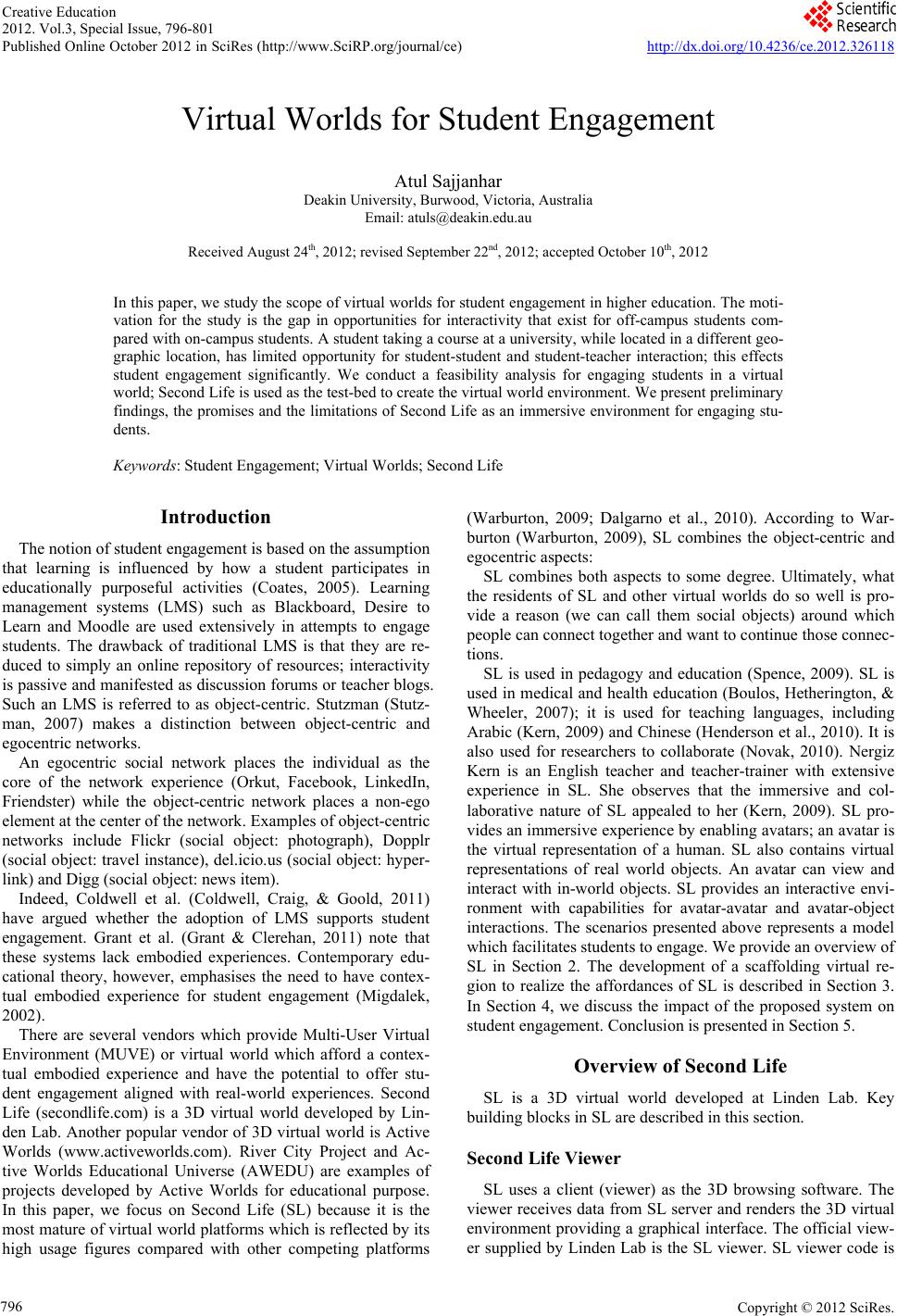 Creative Education 2012. Vol.3, Special Issue, 796-801 Published Online October 2012 in SciRes (http://www.SciRP.org/journal/ce) http://dx.doi.org/10.4236/ce.2012.326118 Copyright © 2012 SciRes. 796 Virtual Worlds for Student Engagement Atul Sajjanhar Deakin University, Burwood, Victoria, Aust ralia Email: [email protected] Received August 24th, 2012; revised September 2 2nd, 2012; accepted October 10th, 2012 In this paper, we study the scope of virtual worlds for student engagement in higher education. The moti- vation for the study is the gap in opportunities for interactivity that exist for off-campus students com- pared with on-campus students. A student taking a course at a university, while located in a different geo- graphic location, has limited opportunity for student-student and student-teacher interaction; this effects student engagement significantly. We conduct a feasibility analysis for engaging students in a virtual world; Second Life is used as the test-bed to create the virtual world environment. We present preliminary findings, the promises and the limitations of Second Life as an immersive environment for engaging stu- dents. Keywords: Student Engagement; Virtual Worlds; Second Life Introduction The notion of student engagement is based on the assumption that learning is influenced by how a student participates in educationally purposeful activities (Coates, 2005). Learning management systems (LMS) such as Blackboard, Desire to Learn and Moodle are used extensively in attempts to engage students. The drawback of traditional LMS is that they are re- duced to simply an online repository of resources; interactivity is passive and manifested as discussion forums or teacher blogs. Such an LMS is referred to as object-centric. Stutzman (Stutz- man, 2007) makes a distinction between object-centric and egocentric networks. An egocentric social network places the individual as the core of the network experience (Orkut, Facebook, LinkedIn, Friendster) while the object-centric network places a non-ego element at the center of the network. Examples of object-centric networks include Flickr (social object: photograph), Dopplr (social object: travel instance), del.icio.us (social object: hyper- link) and Digg (social object: news item). Indeed, Coldwell et al. (Coldwell, Craig, & Goold, 2011) have argued whether the adoption of LMS supports student engagement. Grant et al. (Grant & Clerehan, 2011) note that these systems lack embodied experiences. Contemporary edu- cational theory, however, emphasises the need to have contex- tual embodied experience for student engagement (Migdalek, 2002). There are several vendors which provide Multi-User Virtual Environment (MUVE) or virtual world which afford a contex- tual embodied experience and have the potential to offer stu- dent engagement aligned with real-world experiences. Second Life (secondlife.com) is a 3D virtual world developed by Lin- den Lab. Another popular vendor of 3D virtual world is Active Worlds (www.activeworlds.com). River City Project and Ac- tive Worlds Educational Universe (AWEDU) are examples of projects developed by Active Worlds for educational purpose. In this paper, we focus on Second Life (SL) because it is the most mature of virtual world platforms which is reflected by its high usage figures compared with other competing platforms (Warburton, 2009; Dalgarno et al., 2010). According to War- burton (Warburton, 2009), SL combines the object-centric and egocentric aspects: SL combines both aspects to some degree. Ultimately, what the residents of SL and other virtual worlds do so well is pro- vide a reason (we can call them social objects) around which people can connect together and want to continue those connec- tions. SL is used in pedagogy and education (Spence, 2009). SL is used in medical and health education (Boulos, Hetherington, & Wheeler, 2007); it is used for teaching languages, including Arabic (Kern, 2009) and Chinese (Henderson et al., 2010). It is also used for researchers to collaborate (Novak, 2010). Nergiz Kern is an English teacher and teacher-trainer with extensive experience in SL. She observes that the immersive and col- laborative nature of SL appealed to her (Kern, 2009). SL pro- vides an immersive experience by enabling avatars; an avatar is the virtual representation of a human. SL also contains virtual representations of real world objects. An avatar can view and interact with in-world objects. SL provides an interactive envi- ronment with capabilities for avatar-avatar and avatar-object interactions. The scenarios presented above represents a model which facilitates students to engage. We provide an overview of SL in Section 2. The development of a scaffolding virtual re- gion to realize the affordances of SL is described in Section 3. In Section 4, we discuss the impact of the proposed system on student engagement. Conclusion is presented in Section 5. Overview of Second Life SL is a 3D virtual world developed at Linden Lab. Key building blocks in SL are described in this section. Second Life Viewer SL uses a client (viewer) as the 3D browsing software. The viewer receives data from SL server and renders the 3D virtual environment providing a graphical interface. The official view- er supplied by Linden Lab is the SL viewer. SL viewer code is 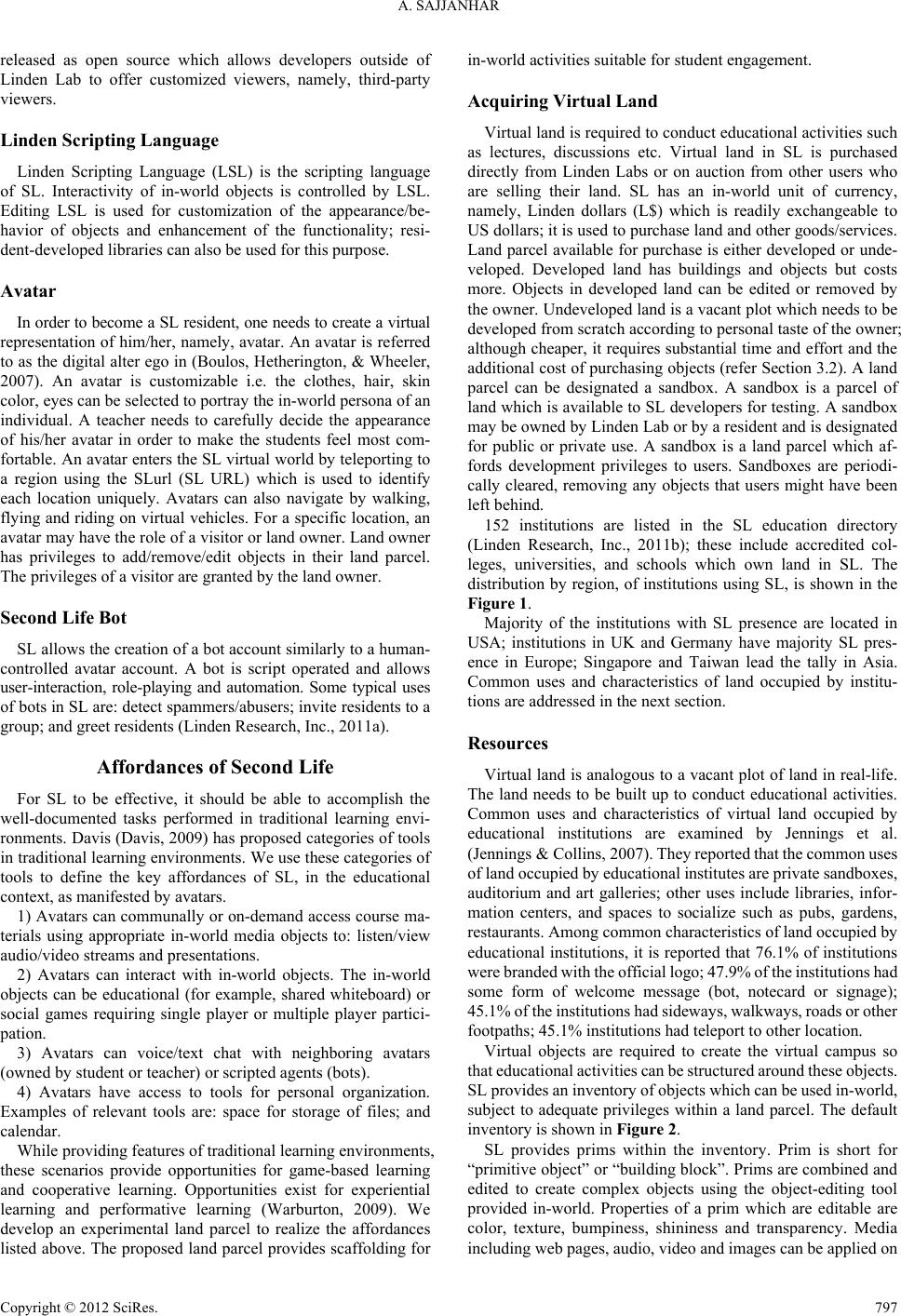 A. SAJJANHAR released as open source which allows developers outside of Linden Lab to offer customized viewers, namely, third-party viewers. Linden Scripting Language Linden Scripting Language (LSL) is the scripting language of SL. Interactivity of in-world objects is controlled by LSL. Editing LSL is used for customization of the appearance/be- havior of objects and enhancement of the functionality; resi- dent-developed libraries can also be used for this purpose. Avatar In order to become a SL re sident, one needs to create a virtual representation of him/her, namely, avatar. An avatar is referred to as the digital alter ego in (Boulos, Hetherington, & Wheeler, 2007). An avatar is customizable i.e. the clothes, hair, skin color, eyes can be selected to portray the in-world persona of an individual. A teacher needs to carefully decide the appearance of his/her avatar in order to make the students feel most com- fortable. An avatar enters the SL virtual world by teleporting to a region using the SLurl (SL URL) which is used to identify each location uniquely. Avatars can also navigate by walking, flying and riding on virtual vehicles. For a specific location, an avatar may have the role of a visitor or land owner. Land owner has privileges to add/remove/edit objects in their land parcel. The privileges of a visitor are granted by the land owner. Second Life Bot SL allows the creation of a bot account similarly to a human- controlled avatar account. A bot is script operated and allows user-interaction, role-playing and automation. Some typical uses of bots in SL are: detect spammers/abusers; invite residents to a group; and greet residents (Linden Research, Inc., 2011a). Affordances of Second Life For SL to be effective, it should be able to accomplish the well-documented tasks performed in traditional learning envi- ronments. Davis (Davis, 2009) has proposed categories of tools in traditional learning environments. We use these categories of tools to define the key affordances of SL, in the educational context, as manifested by avatars. 1) Avatars can communally or on-demand access course ma- terials using appropriate in-world media objects to: listen/view audio/video streams and presentations. 2) Avatars can interact with in-world objects. The in-world objects can be educational (for example, shared whiteboard) or social games requiring single player or multiple player partici- pation. 3) Avatars can voice/text chat with neighboring avatars (owned by student or teacher) or scripted agents (bots). 4) Avatars have access to tools for personal organization. Examples of relevant tools are: space for storage of files; and calendar. While providing features of traditional learning environments, these scenarios provide opportunities for game-based learning and cooperative learning. Opportunities exist for experiential learning and performative learning (Warburton, 2009). We develop an experimental land parcel to realize the affordances listed above. The proposed land parcel provides scaffolding for in-world activities suitable for student engagement. Acquiring Virtual Land Virtual land is required to conduct educational activities such as lectures, discussions etc. Virtual land in SL is purchased directly from Linden Labs or on auction from other users who are selling their land. SL has an in-world unit of currency, namely, Linden dollars (L$) which is readily exchangeable to US dollars; it is used to purchase land and other goods/services. Land parcel available for purchase is either developed or unde- veloped. Developed land has buildings and objects but costs more. Objects in developed land can be edited or removed by the owner. Undeveloped land is a vacant plot which needs to be developed from scratch according to personal taste of the owner; although cheaper, it requires substantial time and effort and the additional cost of purchasing objects (refer Section 3.2). A land parcel can be designated a sandbox. A sandbox is a parcel of land which is available to SL developers for testing. A sandbox may be owned by Linden Lab or by a resident and is designated for public or private use. A sandbox is a land parcel which af- fords development privileges to users. Sandboxes are periodi- cally cleared, removing any objects that users might have been left behind. 152 institutions are listed in the SL education directory (Linden Research, Inc., 2011b); these include accredited col- leges, universities, and schools which own land in SL. The distribution by region, of institutions using SL, is shown in the Figure 1. Majority of the institutions with SL presence are located in USA; institutions in UK and Germany have majority SL pres- ence in Europe; Singapore and Taiwan lead the tally in Asia. Common uses and characteristics of land occupied by institu- tions are addressed in the next section. Resources Virtual land is analogous to a vacant plot of land in real-life. The land needs to be built up to conduct educational activities. Common uses and characteristics of virtual land occupied by educational institutions are examined by Jennings et al. (Jennings & Collins, 2007). They r eported th at the common uses of land occupied by educational i nstitutes are private sandbox es, auditorium and art galleries; other uses include libraries, infor- mation centers, and spaces to socialize such as pubs, gardens, restaurants. Among common ch ara cteristics of land occupied by educational institutions, it is reported that 76.1% of institutions were branded w ith the official logo; 47.9% of the institutions had some form of welcome message (bot, notecard or signage); 45.1% of the institutions had side ways, walkways, roads or other footpaths; 45.1% institutions had teleport to other location. Virtual objects are required to create the virtual campus so that educational act ivities can be structured around these objects. SL provides an inventory of objects which can be used in-world, subject to adequate privileges within a land parcel. The default inventory is shown in Figure 2. SL provides prims within the inventory. Prim is short for “primitive object” or “building block”. Prims are combined and edited to create complex objects using the object-editing tool provided in-world. Properties of a prim which are editable are color, texture, bumpiness, shininess and transparency. Media including web pages, audio, video and images can be applied on Copyright © 2012 SciRes. 797 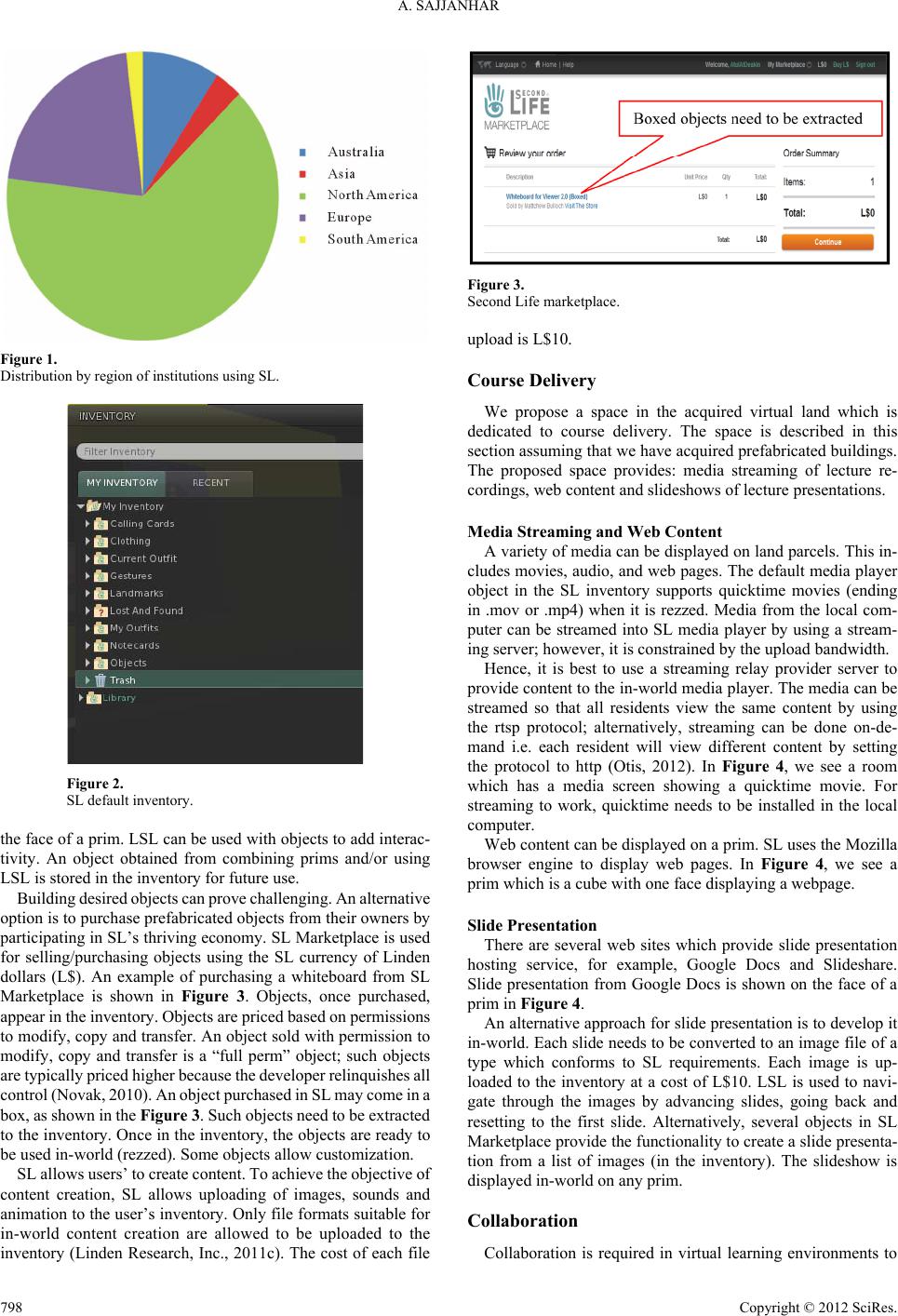 A. SAJJANHAR Figure 1. Distribution by region of institutions using SL. Figure 2. SL default inventory. the face of a prim. LSL can be used with objects to add interac- tivity. An object obtained from combining prims and/or using LSL is stored in the inventory for future use. Building desired o bjects can prove challenging. A n alternative option is to purchase prefabricated objects from their owners by participating in SL’s thriving economy. SL Marketplace is used for selling/purchasing objects using the SL currency of Linden dollars (L$). An example of purchasing a whiteboard from SL Marketplace is shown in Figure 3. Objects, once purchased, appear in the inventor y. Objects are priced b ased on permissions to modify, copy and transfer. An object sold with permission to modify, copy and transfer is a “full perm” object; such objects are typically priced higher because the developer relinquishes all control (Novak, 2010). An object purchased in SL may come in a box, as shown in the Figure 3. Such objects need to be extract ed to the inventory. Once in the inventory, the objects are ready to be used in-world (rezzed). Some objects allow customization. SL allows users’ to create con tent. To achieve the objective of content creation, SL allows uploading of images, sounds and animation to the user’s inventory. Only file formats suitable for in-world content creation are allowed to be uploaded to the inventory (Linden Research, Inc., 2011c). The cost of each file Figure 3. Second Life marketplace. upload is L$10. Course Delive r y We propose a space in the acquired virtual land which is dedicated to course delivery. The space is described in this section assuming that we have acquired prefabricated buildings. The proposed space provides: media streaming of lecture re- cordings, web content and slideshows of lecture presentations. Media Streaming and Web Content A variety of media can be displayed on land parcels. This in- cludes movies, audio, and web pages. The default media player object in the SL inventory supports quicktime movies (ending in .mov or .mp4) when it is rezzed. Media from the local com- puter can be streamed into SL media player by using a stream- ing server; however, it is constrained by the upload bandwidth. Hence, it is best to use a streaming relay provider server to provide content to the in-world media player. The media can be streamed so that all residents view the same content by using the rtsp protocol; alternatively, streaming can be done on-de- mand i.e. each resident will view different content by setting the protocol to http (Otis, 2012). In Figure 4, we see a room which has a media screen showing a quicktime movie. For streaming to work, quicktime needs to be installed in the local computer. Web content can be displayed on a prim. SL uses the Mozilla browser engine to display web pages. In Figure 4, we see a prim which is a cube with one face displaying a webpage. Slide Presentation There are several web sites which provide slide presentation hosting service, for example, Google Docs and Slideshare. Slide presentation from Google Docs is shown on the face of a prim in Figure 4. An alternative approach for slide presentation is to develop it in-world. Each slide needs to be converted to an image file of a type which conforms to SL requirements. Each image is up- loaded to the inventory at a cost of L$10. LSL is used to navi- gate through the images by advancing slides, going back and resetting to the first slide. Alternatively, several objects in SL Marketplace provide the functionality to create a slide presenta- tion from a list of images (in the inventory). The slideshow is displayed in-world on any prim. Collaboration Collaboration is required in virtual learning environments to Copyright © 2012 SciRes. 798 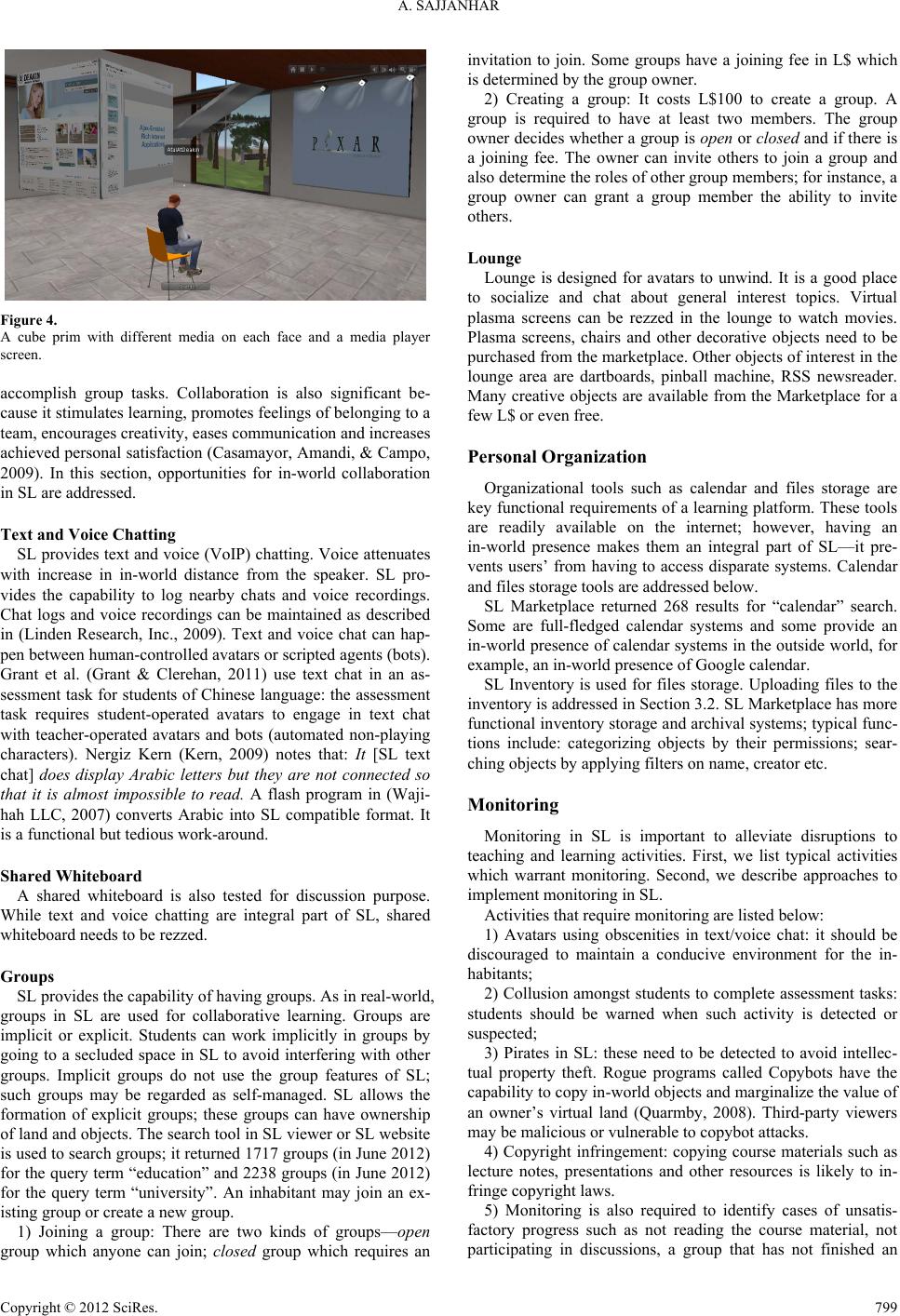 A. SAJJANHAR Figure 4. A cube prim with different media on each face and a media player screen. accomplish group tasks. Collaboration is also significant be- cause it stimulates learning, promotes feelings of belonging to a team, encourages creativity, eases communication and increases achieved personal satisfaction (Casamayor, Amandi, & Campo, 2009). In this section, opportunities for in-world collaboration in SL are addressed. Text and Voice Chatting SL provides text and voice (VoIP) chatting. Voice attenuates with increase in in-world distance from the speaker. SL pro- vides the capability to log nearby chats and voice recordings. Chat logs and voice recordings can be maintained as described in (Linden Research, Inc., 2009). Text and voice chat can hap- pen between human-controlled avatars or scripted agents (bots). Grant et al. (Grant & Clerehan, 2011) use text chat in an as- sessment task for students of Chinese langua ge: the assessment task requires student-operated avatars to engage in text chat with teacher-operated avatars and bots (automated non-playing characters). Nergiz Kern (Kern, 2009) notes that: It [SL text chat] does display Arabic letters but they are not connected so that it is almost impossible to read. A flash program in (Waji- hah LLC, 2007) converts Arabic into SL compatible format. It is a functional but tedious work-around. Shared Whiteboard A shared whiteboard is also tested for discussion purpose. While text and voice chatting are integral part of SL, shared whiteboard needs to be rezzed. Groups SL provides the capability of having groups. As in real-world, groups in SL are used for collaborative learning. Groups are implicit or explicit. Students can work implicitly in groups by going to a secluded space in SL to avoid interfering with other groups. Implicit groups do not use the group features of SL; such groups may be regarded as self-managed. SL allows the formation of explicit groups; these groups can have ownership of land and objects. The search tool in SL viewer or SL website is used to search groups; it returned 1717 groups (in June 2012) for the query term “education” and 2238 groups (in June 2012) for the query term “university”. An inhabitant may join an ex- isting group or create a new group. 1) Joining a group: There are two kinds of groups—open group which anyone can join; closed group which requires an invitation to join. Some groups have a joining fee in L$ which is determined by the group owner. 2) Creating a group: It costs L$100 to create a group. A group is required to have at least two members. The group owner decides whether a group is open or closed and if there is a joining fee. The owner can invite others to join a group and also determine the roles of other group members; for instance, a group owner can grant a group member the ability to invite others. Lounge Lounge is designed for avatars to unwind. It is a good place to socialize and chat about general interest topics. Virtual plasma screens can be rezzed in the lounge to watch movies. Plasma screens, chairs and other decorative objects need to be purchased from the marketplace. Other objects of interest in the lounge area are dartboards, pinball machine, RSS newsreader. Many creative objects are available from the Marketplace for a few L$ or even free. Personal Organization Organizational tools such as calendar and files storage are key functional requirements of a learning platform. These tools are readily available on the internet; however, having an in-world presence makes them an integral part of SL—it pre- vents users’ from having to access disparate systems. Calendar and files storage tools are addressed below. SL Marketplace returned 268 results for “calendar” search. Some are full-fledged calendar systems and some provide an in-world presence of calendar systems in the outside world, for example, an in-world presence of Google calendar. SL Inventory is used for files storage. Uploading files to the inventory is addressed in Section 3.2. SL Marketplace has more functional inventory storage and archival systems; typical func- tions include: categorizing objects by their permissions; sear- ching objects by applying filters on name, creator etc. Monitoring Monitoring in SL is important to alleviate disruptions to teaching and learning activities. First, we list typical activities which warrant monitoring. Second, we describe approaches to implement monitoring i n SL . Activities that require monitoring are listed below: 1) Avatars using obscenities in text/voice chat: it should be discouraged to maintain a conducive environment for the in- habitants; 2) Collusion amongst students to complete assessment tasks: students should be warned when such activity is detected or suspected; 3) Pirates in SL: these need to be detected to avoid intellec- tual property theft. Rogue programs called Copybots have the capability to copy in-world objects and marginalize the value of an owner’s virtual land (Quarmby, 2008). Third-party viewers may be malicious or vulnerable to copybot attacks. 4) Copyright infringement: copying course materials such as lecture notes, presentations and other resources is likely to in- fringe copyright l aw s. 5) Monitoring is also required to identify cases of unsatis- factory progress such as not reading the course material, not participating in discussions, a group that has not finished an Copyright © 2012 SciRes. 799  A. SAJJANHAR allocated task etc. SL provides tools which can be used as mitigating controls for activities listed above. These are discussed below: 1) Group moderation: SL group moderator has the capability to moderate a group’s voice and text chat. The group moderator can exercise the option to disable text chat or mute voice chat of a group member. 2) SL provides the capability to log nearby chats and voice recordings. Chat logs and voice recordings can be maintained as shown in (Record voice chat and sounds). It is appropriate to use a bot account for these purposes in order to have an unin- terrupted record of the data. Chat logs and voice recordings can be vital evidence for in-world misdemeanors including aca- demic misconduct such as collusion. The logs/recordings can be automatically/semi-automatically analyzed to resolve dis- putes or take disciplinary actions. 3) Copyright infringement can be enforced by SL or owners of intellectual property. Enforcement by SL: An owner of intellectual property in SL can report copyright infringement to SL administrator which can lead to the cancellation of the infringer’s account under Terms of Service (Linden Research, Inc., 2010). Quarmby (Quarmby, 2008) notes that mere cancellation of account may not be a strong disincentive to repeat the behaviour because the infringer can enter SL with another account. Enforcement by owner: An owner may enforce copyright infringement by initiating legal proceedings. However, laws to punish in-world transgressions lack precedence and worldwide standardisation. 4) Agents can be used for in-world monitoring. Log files are used to build students’ profile which includes attributes such as learning style (reflective, sequential etc.), collaboration profile, and progress made in the course (Casamayor, Amandi, & Campo, 2009). Agents use Web Usage Mining (WUM) tech- niques (Srivastava et al., 2000) to draw inferences from student profiles and the teacher is alerted to unusual patterns. Examples of unusual patterns are: strongly sequential student does not perform tasks according to the order specified in the task plan; reflective student finishes the reading very quickly etc. (Casa- mayor, Amandi & Campo, 2009). Once alerted, the teacher has the opportunity to intervene preemptively. Discussion In Section 3, we developed a scaffolding virtual world to re- alize the affordances of SL. The aim of this research is to ad- dress the impact of the virtual world on student engagement of off-campus students. National Survey of Student Engagement (NSSE) survey is widely accepted research initiative to measure student engagement (Robinson & Hullinger, 2008). NSSE measures the dimensions of student engagement on the basis of the Seven Principles of Good Practice in Undergraduate Edu- cation (Chickering & Ehrmann, 1996). Although the NSSE was created for on-campus education, the principles on which it is based have been widely applied to the off-campus context (Robinson & Hullinger, 2008). Hence, we articulate the impact of the virtual world on off-campus student engagement by ad- dressing NSSE benchmarks. NSSE is built on five benchmarks which are addressed below: 1) Level of academic challenge: Level of academic challenge (LAC) refers to the academic effort made by students for ac- tivities such as studying, reading, writing, and preparing for class (Kuh, 2003). Development of mental capacities is an im- portant component of this benchmark; it includes five levels of mental activities, namely, memorization, analysis, synthesis, making judgment, and application (Robinson & Hullinger, 2008). 2) Active and collaborative learning: Active and collabora- tive learning (ACL) refers to efforts of the students to contrib- ute to class discussions, work with other students, and engage in other class activities (Kuh, 2003). 3) Student interaction with faculty members: Student–faculty interaction (SFI) relates to the nature and frequency of contact that students have with their faculty. Contact includes faculty feedback and discussion of grades and assignments, ideas, ca- reers, and collaborative projects (Kuh, 2003). It is reported in (Robinson & Hullinger, 2008) that the most common form of interaction is faculty feedback. 4) Enriching educational experience: An enriching educa- tional experience (EEE) involves the development of the person to learn to work effectively with people from different back- grounds and enables the use of technology to facilitate collabo- ration (Kuh, 2003). 5) Supportive campus environment: Robinson et al. (Robin- son, & Hullinger, 2008) deemed supportive campus environ- ment (SCE) criterion not relevant for the evaluation of student engagement in an online environment; however a virtual cam- pus which is reflective of the physical campus reinforces the institutional spirit (Jennings, & Collins, 2007) and the related support structure offered to students. Online technologies have been shown to positively impact student engagement benchmarks (Kuh, 2003; Dude rstadt, Atkin s, & Houweling, 2002). For instance, online technologies stimu- late students to use higher order skills which improves LAC benchmark; online technologies are credited with ease of com- munication which improves SFI benchmark; having a suppor- tive virtual campus facilitates the initiation of students espe- cially if they lack an IT background. Advantage of SL com- pared with traditional online learning environments is the range of avenues it provides to address the student engagement benchmarks. The embodied experience in SL contributes sig- nificantly to the EEE benchmark by improving interpersonal skills of inhabitants. SL makes it feasible to build a virtual campus which is reflective of the physical campus; this con- tributes to the SCE benchmark. Conclusion In this paper, we describe the use of SL to engage students in a virtual world. Based on literature review and our experience, it is observed that the technology provides a fun and interesting approach for educators and students alike. Our observations are summarized below: 1) The concern of technology being overwhelming is allevi- ated by the fact that a large number of potential users, namely, university students, are digital natives and familiar with virtual worlds in role-playing games such as World of Warcraft. 2) SL does not require rewriting of teaching materials but is modeled around embedding existing materials within SL; this means that there is minimal effort required on the part of the educator to develop a scaffolding virtual environment. 3) SL is invaluable for off-camp us learning because the spa ce is accessible by students in asynchronous or synchronous man- ner. Synchronous access to SL is leveraged by the educators to Copyright © 2012 SciRes. 800  A. SAJJANHAR Copyright © 2012 SciRes. 801 facilitate real-life-like presentations and discussions; students use synchronous access to collaborate on projects/ assignments. Asynchronous access is used to interact with in- world objects (including games) and bots. 4) Besides providing an educational platform for curriculum, SL also enhances social s skills. 5) The potential to use game-based learning in SL is promis- ing. While objects worked well in-world, it is found that foreign language scripts may not be displayed correctly. Although a work-around may exist, this poses limitations to language edu- cators and requires regression testing of objects. REFERENCES Boulos, M. N. K., Hetherington, L., & Wheeler, S. (2007). Second Life: an overview of the potential of 3-D virtual worlds in medical and health education. Health Information & Libraries Journal, 24, 233-245. doi:10.1111/j.1471-1842.2007.00733.x Casamayor, A., Amandi, A., & Campo, M. (2009). Intelligent assis- tance for teachers in collaborative e-learning environments. Com- puters & Education, 53, 1147-1154. doi:10.1016/j.compedu.2009.05.025 Chickering, A. W., & Ehrmann, S. C. (1996). Implementing the seven principles of good practice in undergraduate education: Technology as lever. Accounting Education News, 49, 9-10. Coates, H. (2005). The value of student engagement for higher educa- tion quality assurance. Quality in Higher Education, 11, 25-36. doi:10.1080/13538320500074915 Coldwell, J., Craig, A., & Goold, A. (2011). Using etechnologies for active learning. Interdisciplinary Journal of Information, Knowledge, and Management, 6 , 95-106. Dalgarno, B., Lee, M. J. W., Carlson, L., Gregory, S., & Tynan, B. (2010). 3D immersive virtual worlds in higher education: An Austra- lian and New Zealand scoping study. Australasian Journal of Educa- tional Technology, 27, 269-280. Davis, B. G. (2009). Tools for teaching (2nd ed.). Hoboken, NJ: Wiley Publishers. Duderstadt, J., Atkins, D., & Houweling, D. (2002). Higher education in the digital age: Technology issues and strategies for American colleges and universities. Westp ort, CT: Praeger. Grant, S., & Clerehan, R. (2011). Finding the discipline: Assessing student activity in Second Life. Australasian Journal of Educational Technology, 27, 813–828. Henderson, L., Grant, S., Henderson, M., & Huang, H. (2010). University students’ cognitive engagement while learning in a Virtual World. In D. Gronn, & G. Romeo (Eds.), ACEC2010: Digital diversity. Conference proceedings of the Australian computers in education conference 2010, Melbourne 6-9 April. Carlton, VIC: Australian Council for Computers in Education (ACE C). http://acec2010.acce.edu.au/proposal/498/university-students-cogniti ve-engagement-while-learning-virtual-world Jennings, N., & Collins, C. (2007). Virtual or virtually U: Educational institutions in Second Life. International Journal of Human and So- cial Sciences, 2, 180-186. Kern, N. (2009). Starting a Second Life. URL (last checked 25 May 2012). http://slexperiments.edublogs.org/2009/03/03/starting-a-second-life/ Kuh, G. D. (2003). What we’re learning about student engagement from NSSE: Benchmarks for effective educational practices. Change: The Magazine of Higher Learning, 35, 24-32. doi:10.1080/00091380309604090 Linden Research, Inc. (2009). Record voice chat and sounds. URL (last checked 18 June 2012). http://www.screencast.com/users/Featured/folders/Featured/media/cf 26872f-fa66-418b-89e8-47d9f3a13b02 Linden Research, Inc. (2010). Second Life terms of service. http://secondlife.com/corporate/tos.php Linden Research, Inc. (2011a). Second Life bot. URL (last checked 15 May 2012). http://wiki.second life.com/wiki/Bot Linden Research, Inc. (2011b). Second Life education. URL (last che- cked 5 April 2011). http://wiki.secondlife.com/wiki/Second_Life_Education Linden Research, Inc. (2011c). Second Life uploading assets. URL (last checked 20 June 2012). http://community.secondlife.com/t5/English-Knowledge-Base/Uploa ding-assets/ta-p/700165 Migdalek, J. (2002). Performing English: The classroom as rehearsal space. Prospect, 17, 53-61. Novak, T. P. (2010). eLab city: A platform for academic research on virtual worlds. Journal of Virtual Worlds Research, 3, 3-33. Otis, J. (2012) How to stream in Second Life. URL (last checked 22 May 2012). http://howto.slserver.com/ Quarmby, B. (2008). Pirates among the Second Life islands—Why you should monitor the misuse of your intellectual property in online vir- tual worlds. URL (last checked 25 May 2012). http://works.bepress.com/ben_quarmby/2 Robinson, C. C. and Hullinger, H. (2008). New benchmarks in higher education: Student engagement in online learning. Journal of Educa- tion for Business, 84, 101-109. doi:10.3200/JOEB.84.2.101-109 Spence, J. (2009). Pedagogy, education and innovation in vir t ual worlds. Journal of Virtual Worlds Research, 2, 3-4. Srivastava, J., Cooley, R., Deshpande, M., & Tan, P. (2000). Web us- age mining: Discovery and applications of usage patterns from web data. SIGKDD Explorations Newsletter, 1, 12-23. doi:10.1145/846183.846188 Stutzman, F. (2007). Social network transitions. URL (last checked 27 July 2012). http://chimprawk.blogspot.com/2007/11/social-network-transitions.ht ml Wajihah LLC (2007). Text conversion. URL (last checked 25 May 2012). http://convert.wajihah.com/convert.html Warburton, W. (2009). Second Life in higher education: Assessing the potential for and the barriers to deploying virtual worlds in learning and teaching. British Journal of Educational Technology, 40, 414- 426. doi:10.1111/j.1467-8535.2009.00952.x |