

Paper Menu >>
Journal Menu >>
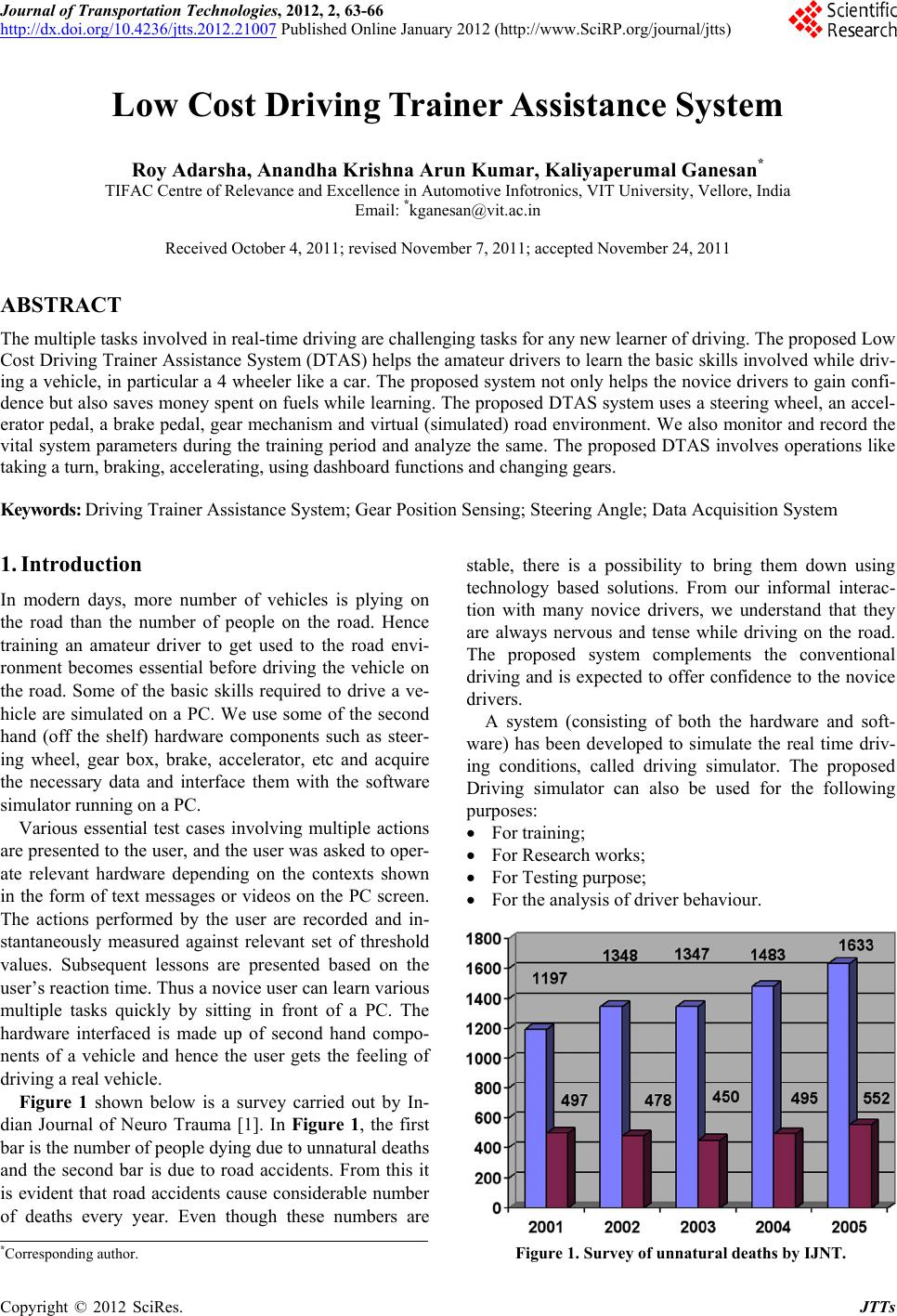 Journal of Transportation Technologies, 2012, 2, 63-66 http://dx.doi.org/10.4236/jtts.2012.21007 Published Online January 2012 (http://www.SciRP.org/journal/jtts) Low Cost Driving Trainer Assistance System Roy Adarsha, Anandha Krishna Arun Kumar, Kaliyaperumal Ganesan* TIFAC Centre of Relevance and Excellence in Automotive Infotronics, VIT University, Vellore, India Email: *[email protected] Received October 4, 2011; revised November 7, 2011; accepted November 24, 2011 ABSTRACT The multiple tasks involved in real-time driv ing are challengin g task s for any new learner of driv ing. The pro pos ed Low Cost Driving Trainer Assistance System (DTAS) helps the amateur drivers to learn the basic skills involved while driv- ing a vehicle, in particular a 4 wheeler like a car. The proposed system not only helps the novice drivers to gain confi- dence but also saves money spent on fuels while learning. The proposed DTAS system uses a steering wheel, an accel- erator pedal, a brake pedal, gear mechanism and virtual (simulated) road environment. We also monitor and record the vital system parameters during the training period and analyze the same. The proposed DTAS involves operations like taking a turn, braking, accelerating, using dashboard functions and changing gears. Keywords: Driving Trainer Assistance System; Gear Position Sensing; Steering Angle; Data Acquisition System 1. Introduction In modern days, more number of vehicles is plying on the road than the number of people on the road. Hence training an amateur driver to get used to the road envi- ronment becomes essential before driving the vehicle on the road. Some of the basic skills required to drive a ve- hicle are simulated on a PC. We use some of the second hand (off the shelf) hardware components such as steer- ing wheel, gear box, brake, accelerator, etc and acquire the necessary data and interface them with the software simulator running on a PC. Various essential test cases involving multiple actions are pre sented to the u ser, and the user was ask ed to oper- ate relevant hardware depending on the contexts shown in the form of text messages or videos on the PC screen. The actions performed by the user are recorded and in- stantaneously measured against relevant set of threshold values. Subsequent lessons are presented based on the user’s reaction time. Thus a novice user can learn various multiple tasks quickly by sitting in front of a PC. The hardware interfaced is made up of second hand compo- nents of a vehicle and hence the user gets the feeling of driving a real vehicle. Figure 1 shown below is a survey carried out by In- dian Journal of Neuro Trauma [1]. In Figure 1, the first bar is the number of people dying due to unnatural deaths and the second bar is due to road accidents. From this it is evident that road accidents cause considerable number of deaths every year. Even though these numbers are stable, there is a possibility to bring them down using technology based solutions. From our informal interac- tion with many novice drivers, we understand that they are always nervous and tense while driving on the road. The proposed system complements the conventional driving and is expected to offer confidence to the novice drivers. A system (consisting of both the hardware and soft- ware) has been developed to simulate the real time driv- ing conditions, called driving simulator. The proposed Driving simulator can also be used for the following purposes: For training; For Research works; For Testing purpose; For the analysis of driver behaviour. *Corresponding author. Figure 1. Survey of unnatural deaths by IJNT. C opyright © 2012 SciRes. JTTs 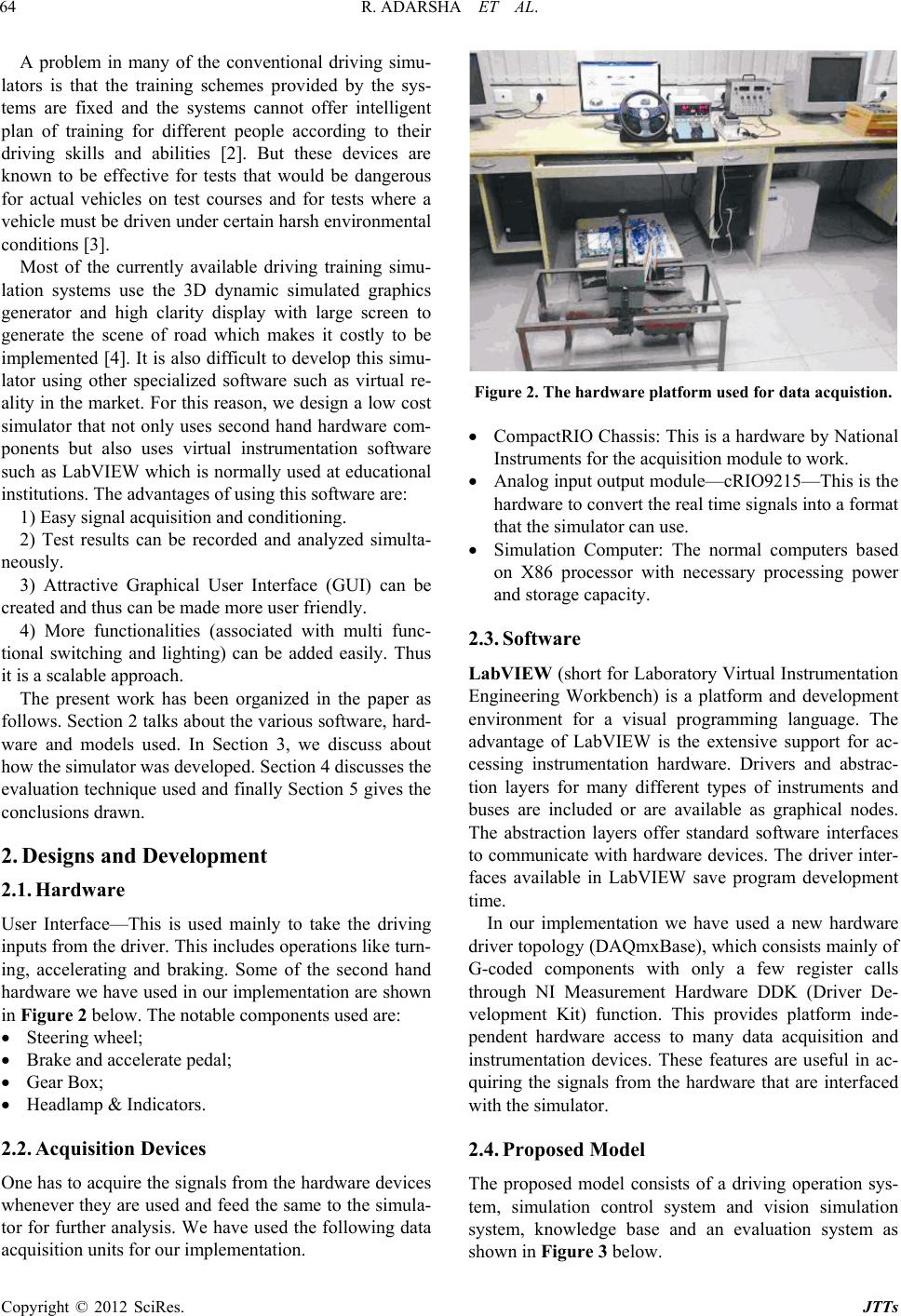 R. ADARSHA ET AL. 64 A problem in many of the conventional driving simu- lators is that the training schemes provided by the sys- tems are fixed and the systems cannot offer intelligent plan of training for different people according to their driving skills and abilities [2]. But these devices are known to be effective for tests that would be dangerous for actual vehicles on test courses and for tests where a vehicle must be driven under certain harsh environmental conditions [3]. Most of the currently available driving training simu- lation systems use the 3D dynamic simulated graphics generator and high clarity display with large screen to generate the scene of road which makes it costly to be implemented [4]. It is also difficult to develop this simu- lator using other specialized software such as virtual re- ality in the market. For this reason, we design a low cost simulator that not only uses second hand hardware com- ponents but also uses virtual instrumentation software such as LabVIEW which is normally used at educational institutions. The advantages of using this software are: 1) Easy signal acquisition and conditioning. 2) Test results can be recorded and analyzed simulta- neously. 3) Attractive Graphical User Interface (GUI) can be created and thus can be made more user friendly. 4) More functionalities (associated with multi func- tional switching and lighting) can be added easily. Thus it is a scalable approach. The present work has been organized in the paper as follows. Section 2 talks about the various software, hard- ware and models used. In Section 3, we discuss about how the simulator was developed. Section 4 discusses the evaluation technique used and finally Section 5 gives the conclusions drawn. 2. Designs and Development 2.1. Hardware User Interface—This is used mainly to take the driving inputs from the driver. This includes operation s like turn- ing, accelerating and braking. Some of the second hand hardware we have used in our implementation are shown in Figure 2 below. The not a b le com p on ents used are: Steering wheel; Brake and accelerate pedal; Gear Box; Headlamp & Indicators. 2.2. Acquisition Devices One has to acquire the signals from the hardware devices whenever they are used and feed the same to the simula- tor for further analysis. We have used the following data acquisition units for our implementation. Figure 2. The hardware platform used for data ac quistion. CompactRIO Chassis: This is a hardware by National Instruments for the acquisition module to work. Analog input output module—cRIO9215—This is the hardware to convert the real time signa ls into a format that the simulator can use. Simulation Computer: The normal computers based on X86 processor with necessary processing power and storage capacity. 2.3. Software LabVIEW (short for Laboratory Virtual Instrumentation Engineering Workbench) is a platform and development environment for a visual programming language. The advantage of LabVIEW is the extensive support for ac- cessing instrumentation hardware. Drivers and abstrac- tion layers for many different types of instruments and buses are included or are available as graphical nodes. The abstraction layers offer standard software interfaces to communicate with hardware devices. The driver inter- faces available in LabVIEW save program development time. In our implementation we have used a new hardware driver topology (DAQmxBase) , which consists mainly of G-coded components with only a few register calls through NI Measurement Hardware DDK (Driver De- velopment Kit) function. This provides platform inde- pendent hardware access to many data acquisition and instrumentation devices. These features are useful in ac- quiring the signals from the hardware that are interfaced with the simulator. 2.4. Proposed Model The proposed model consists of a driving operation sys- tem, simulation control system and vision simulation system, knowledge base and an evaluation system as shown in Figure 3 below. Copyright © 2012 SciRes. JTTs  R. ADARSHA ET AL. 65 Figure 3. Working model. 1) Database: The database part of the block diagram includes the database, knowledge base, visual base and an evaluation system where all the values required for the evaluation of the task and the vehicle environment videos are stored. 2) Operational and control part: This part includes the driving operation system, simulation control system, vi- sion simulation system and kinematics simulation system. All these are useful in actuating the necessary control actions. 3) User: Depending on the user, the values from the component enters the operation part which is then evalu- ated by the database part. 3. Simulator Development The simulator is designed in such a way that a vid eo will be continuously running on the GUI displayed on a PC monitor and depending on the situation (shown on the video), the driver has to react. For example, if a particu- lar situation occurs at the 12th second, the user has to react within few seconds (depending on the critically of the event occurred). Thus the driver is monitored to see whether necessary actions are performed by him or not. Some of the operations that are simulated in our study are as follows: 1) Accelerate: Here the user has to apply some pres- sure on the accelerator pedal. If the user is not doing so within a certain time limit, then the u ser is forced to do it again. 2) Brake: In this task the user has to apply certain pres- sure on the brake peda l within certain time limit depend- ing on the context or speed limits shown on the video. 3) Turn: Here the user has to turn the steering wheel to the left or right hand side as shown by DTAS. 4) Gear box: Here the user has to change the gear de- pending up on the speed of the vehicle. 5) Headlamp: Here the user has to switch the head- lamp between dim and dip mode based on the speed of the vehicle. 6) Indicator: Here the user has to operate the indicator before turning. 7) Multiple operations: This involves multiple things like combination of acceleratio n, braking, turning to left/ right and changing relevant gears. The simulator is designed in such a way that it not only checks the ability of the user to perform the basic tasks of driving, but also checks the concentration of the driver. This is done by giving random tasks that need multiple operations (which are time critical) to the user. Each task that the user has to perform is verified to be correct if the corresponding parameters of the operation obtained from the DAQ device or indicator controls is within the range set in the knowledge base. This is ex- plained in Figure 4. If the task fails, the user has to perform the task again and if he fails more than three times then he has to restart the simulator. The task is also rendered failed if the user is not able to respond within a stipulated time. The tim- ing and other knowledge base values can be set by the trainer by manipulating the knowledge base which is kept separately for this purpose. 3.1. Front Panel Design The front panels consists of a speedometer to give the feeling of real time dashboard, indicators for turning, task status indicator, gear shift position indicator, picture indicator which tells the user to do a certain task, LED to indicate up to what limit a certain operation has to be done for a given task. The speed is calculated using the equation: vuat (1) Here “v” is the final velocity, “u” is th e initial velocity and “a” is the acceleration from the accelerator pedal and “t” is the time taken from the start of the task. Figure 5 shown below is one of the front panel GUI used by the user while learning driving. The GUI not only gives text and image based instructions to the user and also displays the real time data (as is normally show n in the vehicle). The LED indicator informs the user about the timing information. Thus by looking at this single interface a user can understand how quickly he is learn- ing the driving lessons. The interface can also be cus- tomized according to the user level. 3.2. LabVIEW Design The block diagram design shown in Figure 5 above con- sists of five parts as explained below: 1) To start with, the first part fetches the information from the knowledge base about what task one has to do and the corresponding ideal parameters to the evaluation part. 2) DAQ assistant part is used to acquire the signals generated by the sensors which are attached with the con- trols. 3) Evaluation part: The driver’s proficiency is evaluated Copyright © 2012 SciRes. JTTs  R. ADARSHA ET AL. Copyright © 2012 SciRes. JTTs 66 Figure 4. The task evaluation model. Figure 5. GUI design used in one of the training modules. based on the various inputs like steering position, gear position, brake pedal pressure, accelerator pedal pressure, etc. The brake and accelerator pressure are evaluated together by calculating the speed using the Equation (1). Along with th ese, the sequen ce of operations is also eva- luated here. For example, to take a turn one has to reduce the speed by braking, shifting gears and then steering to turn. 4) Visual Interface: This part enables the driver to see the road condition s as if there is a cockpit in a car. Video data base has been used. Depending on various circum- stances the driver has to act within certain time limit as decided by the timi ng pa rt . 5) Timing part: For each task, the learner has to do the tasks depending on the road conditions shown to him. A standard reaction time is set for evaluating the reaction time of the driver. 4. Evaluation Techniques and Trainer Also, multiple tasks with parallel data acquisition is de- signed to test the driver concentration on each of the ve- hicle controls. This is done by evaluating the tasks and in parallel running another while loop for data acquisition. n Ambassador car gear box is taken and an array of infrared sensor system is deployed to check the gear po- sition for the evalua tion of the correct gear position for a given speed [5]. In the proposed trainer system, speed is taken as the reference signal while th e steering angle and the gear position data are used for evaluation purpose. 5. Conclusion There are many commercially available DTAS in the market. But most of them are very expensive. An attempt is made to design a low-cost driver trainer assistance system. The hardware peripherals used are second hand (used) ones. The software made is to run on a general purpose common PC to reduce the cost further. One can add more modules (both hardware and software) and scale the same if new driving rules emerge. It can be customized according to people and region. A user gets a real time feeling and also can learn as much as he wants without spending on fuel costs. The logged information is useful for evaluating the drivers. The proposed system complements the conventional driving. 6. Acknowledgements This work forms part of the Research and Development activities of TIFAC-CORE in Automotive Infotronics, VIT University, and Vellore, India. The authors would like to thank the Centre for providing necessary hardware and software support. Adarsh Roy and Arun Kumar would like to acknowledge Miss. Shalini, Development Engineer and Mr. Saravanan, Development Engineer for the help rendered. REFERENCES [1] A. Kumar, S. Lalwani, D. Agrawal and R. Rautji, “Fatal Road Traffic Accidents and Their Relationship with Head Injuries: An Epidemiological Survey of Five Years,” In- dian Journal of Neurotrauma, Vol. 5, No. 2, 2008, pp. 63-67. [2] A. Auckland, J. Manning, et al., “Advanced Driver As- sistance Systems: Objective and Subjective Performance Evaluation,” Vehicle System Dynamics, Vol. 46, Supple- ment 1, 2008, pp. 883-897. doi:10.1080/00423110802037131 [3] J. Q. Wang, S. B. Li, X. Y. Huang and K. Q. Li, “A Driv- ing Simulation Platform Applied to Develop Driver As- sistance Systems,” IEEE Vehicle Power and Propulsion Conference, Dearborn, 7-10 September 2009, pp. 878-883. doi:10.1109/VPPC.2009.528975 5 [4] J. Fan and L. R. Xiong, et al., “Intelligent Driving Train- ing Simulation System Based on Virtual Reality,” Pro- ceedings of IEEE Intelligent Transportation Systems, Vol. 1, 2003, pp. 27-30. [5] K. Ganesan and P. S. Babu, “Sensor Based Gear Position Identification System,” The Journal of the Instrument So- ciety of India, Vol. 41, No. 3, 2011, pp. 158-160. A |